
Home / Examples / Stress Analysis [Galileo] / Example 54: Inelastic Collision
An object with an initial velocity collides with another inelastically. Transient analysis is performed.
The same model as Example 32: Elastic Collision
Large deformation (Large displacement / Large strain) is used.
See Technical Note Analysis of Large Deformation (Geometric Nonlinearity).
The stresses and the deformations are solved.
Unless specified in the list below, the default conditions will be applied.
The stress transient analysis, Elasto-plastic material and Large strain are available in an optional package.
Item |
Settings |
Analysis Space |
2D |
Model Unit |
mm |
To simplify the simulation, the 2D model is created and analyzed.
[Large Deformation] is selected, as it is expected.
Item |
Settings |
Solver |
Stress Analysis [Galileo] |
Analysis Type |
Transient Analysis |
Large deformation |
Select both [Large Displacement] and [Large Strain] |
The transient analysis is set up as follows.
The time steps after the collision are smaller than those before the collision.
Tab |
Setting Item |
Settings |
||||||||||||
Transient analysis |
Table |
|

Circular sheet bodies represent objects.
The contactor and contactee surfaces are paired on the [Boundary Pair] dialog box.
Body Number/Type |
Body Attribute Name |
Material Name |
0/Sheet |
Body_Attribute_001 |
ElastoPlastic |
1/Sheet |
Body_Attribute_002 |
ElastoPlastic |
The material of these two bodies is elasto-plastic.
Material Name |
Tab |
Properties |
ElastoPlastic |
Elasticity |
Material Type: Elasto-plastic bilinear Temperature Dependency: None Material Property: Young's Modulus: 1.26x10⁹ [Pa] Poisson's Ratio: 0.3 Strain Hardening Rate : 1.26x10⁸ [Pa] Initial Yield Stress: 1.0x10⁷ [Pa] |
The initial velocity of the right object is set as follows. That of the left object is 0 by default.
Body Attribute Name |
Initial Velocity |
Body_Attribute_002 |
X component: -100 [m/s] Y and Z components: 0 [m/s] |
Boundary Condition Name/Topology |
Tab |
Boundary Condition Type |
Settings |
Contactor/Edge |
Mechanical |
Contact Surface |
Select [Contactor Surface]. |
Target/Edge |
Mechanical |
Contact Surface |
Select [Contactee Surface]. |
The contactor and contactee surfaces are designated as a contact pair on the [Boundary Pair] dialog box. In contact analyses, the contact surfaces must be designated as a boundary pair.
The equivalent plastic strain distributions at 1.5e-4 [s] and 3.0e-4 [s] are shown below.
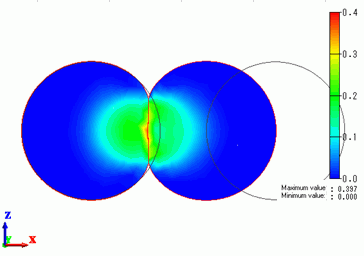
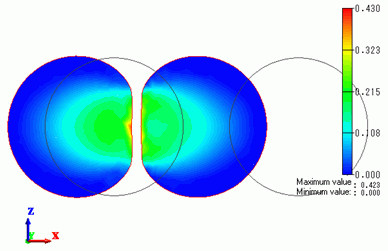
Plastic strains are exhibited around the contact area.
The deformations due to the plastic strains remain even after the collision.
The chart below shows the velocities of 2 objects over time.
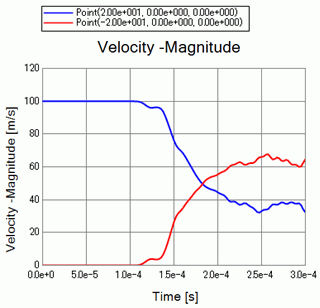
The blue and red plots are for the right and left objects respectively.
The velocity is transferred from the right object to the left at 1.0e-4 [s] through 2.0e-4 [s].
The velocity is not transferred fully to the left object. The velocity still remain on the right object.
The objects collide with each other inelastically.
The velocity is not fully transferred unlike [Example 32: Elastic Collision].