General
Home / Examples / Stress Analysis [Galileo] / Example 19: Two Plates Adhered at Both Ends (Simple Contact #1)
The model is a bimetal stacked with plate materials having different coefficients of linear thermal expansion.
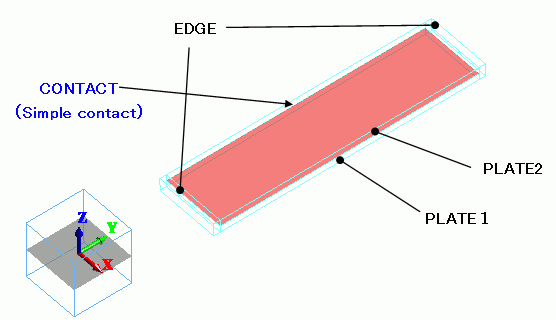
Both ends are fixed and the simple contact boundary condition is set to the boundaries other than the ends.
The bar is subjected to the thermal load caused by temperature variation.
The deformation, the displacement distribution, and the stress distribution are solved.
Unless specified in the list below, the default conditions will be applied.
Results will vary depending on Femtet version and the PC environment.
Item |
Settings |
Analysis Space |
3D |
Model Unit |
mm |
The temperature is applied evenly on the model.
Opt for the thermal load in the analysis condition, and set the reference temperature and the reached temperature.
There is no need to couple with the thermal analysis [Watt].
Item |
Settings |
Solver |
Stress Analysis [Galileo] |
Analysis Type |
Static Analysis |
Options |
Select Thermal load |
The Step/Thermal Load tab is set as follows.
Tab |
Setting Item |
Settings |
Step/Thermal Load |
Reference Temperature |
25 [deg] |
Step/Reached Temperature Setting |
Step 1: 50 [deg] |
Body Number/Type |
Body Attribute Name |
Material Name |
0/Solid |
TERMINAL |
MAT3 |
1/Solid |
PLATE1 |
MAT1 |
2/Solid |
PLATE2 |
MAT2 |
3/Solid |
TERMINAL |
MAT3 |
The material properties are set up as follows:
MAT2 has a much higher linear thermal expansion coefficient than MAT1.
Material Name |
Tab |
Properties |
MAT1 |
Elasticity |
Young's Modulus: 10×109 [Pa] Poisson's Ratio: 0.3 |
Coefficient of Linear Thermal Expansion |
5×10⁻⁶ [1/deg] |
|
MAT2 |
Elasticity |
Young's Modulus: 10×109 [Pa] Poisson's Ratio: 0.3 |
Coefficient of Linear Thermal Expansion |
10×10-6 [1/deg] |
|
MAT3 |
Elasticity |
Young's modulus: 10×109 [Pa] Poisson's Ratio: 0.3 |
Coefficient of Linear Thermal Expansion |
0×10-6 [1/deg] |
Boundary Condition Name/Topology |
Tab |
Boundary Condition Type |
Settings |
CONTACT/Face |
Mechanical |
Simple Contact |
Simple Contact Classification : Automatic Judgment |
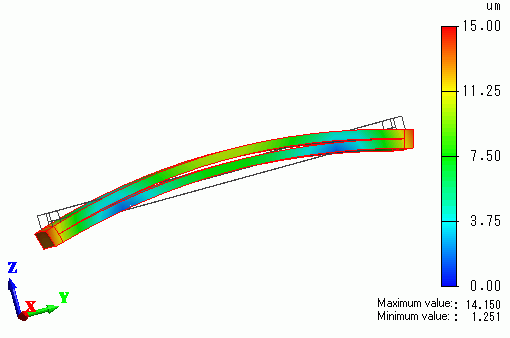
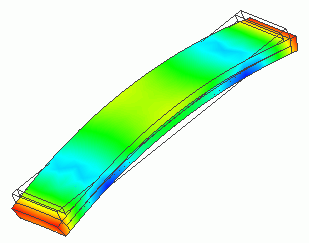
The contour diagram shows the magnitude of displacement.
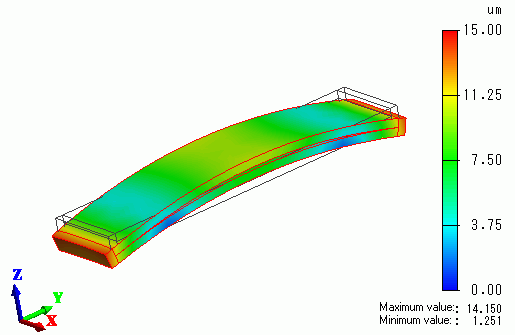
The bi-metal is deformed by the thermal load and a gap appears between the plates.
The diagram below shows the side view.