General
Home / Examples / Stress Analysis [Galileo] / Example 21: Plastic Block Set with Uniform Displacement
The [Uniform Displacement] boundary condition is studied.
The displacement is set to be constant in the uniform displacement direction. The deformation is not allowed in that direction.
The uniform displacement can be set for each direction.
The deformation, the displacement distribution, and the stress distribution are solved.
Unless specified in the list below, the default conditions will be applied.
Results will vary depending on Femtet version and the PC environment.
Item |
Settings |
Analysis Space |
3D |
Model Unit |
mm |
Uniform displacement is specified in the boundary condition of the model.
Item |
Settings |
Solver |
Stress Analysis [Galileo] |
Analysis Type |
Static Analysis |
Options |
Select Thermal load |
The Step/Thermal Load tab is set as follows.
Tabs |
Setting Item |
Settings |
Step/Thermal Load |
Reference Temperature |
25 [deg] |
Step/Reached Temperature Setting |
Step 1: 85 [deg] |
The box-shape solid body is created. The material is the polyethylene.
Two faces are set with the uniform displacement boundary condition.
The boundary conditions are called RIGID1 and RIGID2.

Body Number/Type |
Body Attribute Name |
Material Name |
0/Solid |
BLOCK |
000_Polyethylene(PE) * |
* Available from the material DB
Boundary Condition Name/Topology |
Tab |
Boundary Condition Type |
Settings |
Rigid1/Face |
Mechanical |
Free |
Uniform Displacement: Select UX: Select UY: Select UZ: Select |
Rigid2/Face |
Mechanical |
Free |
Uniform Displacement: Select UX: Select UY: Select UZ: Select |
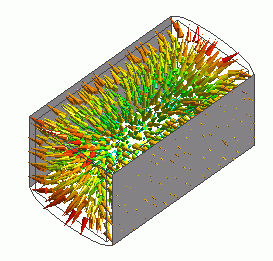
The vectors of the deformation are shown below.
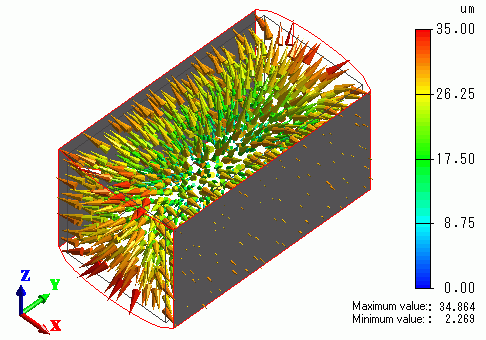
The model swells due to the temperature increase.
The faces (in gray) that are set with uniform displacement make a displacement in the X direction but exhibit no deformation.
Two uniform displacement faces are given different names in the model above. If they have the same name, the results will look like the below.
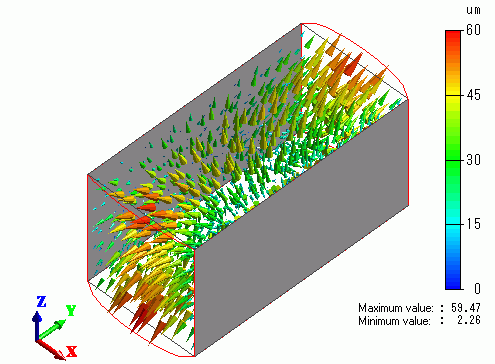
The displacements of both faces are considered to be exactly the same. Since the direction of displacement on each face is opposite,
the displacements cancel each other.
Uniform displacement can be set for each direction.
Deselect UY and UZ. The result will be like below.
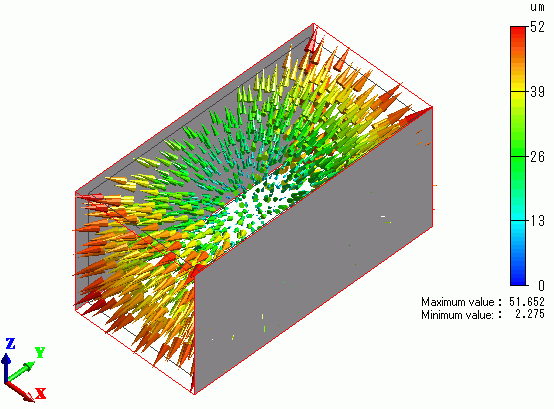
The displacement is fixed in the X direction, but free in the Y and Z directions.