
General
Home / Examples / Stress Analysis [Galileo] / Example 26: Deformation of Cantilevers Made of Elasto-Plastic Bilinear Material and Elastic Material
A cantilever made of elasto-plastic bilinear material and the other made of elastic material are analyzed together for comparison..
The deformation, the displacement distribution and the stress distribution are solved.
Unless specified in the list below, the default conditions will be applied.
Elasto-plastic analysis is available in an optional package.
Item |
Settings |
Analysis Space |
3D |
Model Unit |
m |
Item |
Settings |
Solver |
Stress Analysis [Galileo] |
Analysis Type |
Static Analysis |
Options |
Select [Acceleration]. |
The acceleration tab is set up as follows.
Tab |
Item |
Settings |
Acceleration |
Acceleration |
X=Y=0.0, Z=-9.8 [m/s2] |
The nonlinear analysis is set up on the Step/Thermal Load tab as follows.
If [Add unloading step] is selected, the deformation can be analyzed after the removal of load which was created by the acceleration.
Tab |
Item |
Settings |
Step/Thermal Load |
Step/Reached Temperature Setting |
Substeps of Step 1 : 1 |
Options for the Nonlinear Analysis |
Add unloading step : Select |
Two cantilevers are the same shape. Both are subjected to the gravity in -Z direction.
One is made of elasto-plastic material (body number 2). The other is made of elastic material (body number 3).
All the material properties but the elasticity are the same.

The general mesh size is set at 0.05 [m] for the cantilever’s length of 2 [m].
Body Number/Type |
Body Attribute Name |
Material Name |
2/Solid |
BA1 |
ElastoPlasticMaterial |
3/Solid |
BA1 |
ElasticMaterial |
The material properties are set up as follows:
Material Name |
Tab |
Properties |
ElasticMaterial |
Elasticity |
Material Type: Elastic/Isotropic Young's Modulus: 100×109 [Pa] Poisson's Ratio: 0.3 |
Density |
500×103 [kg/m3] |
|
ElastoPlasticMaterial |
Elasticity |
Material Type: Elasto-plastic/Bilinear, Isotropic Young's Modulus: 100×109 [Pa] Poisson's Ratio: 0.3 Strain Hardening Rate: 20×109 [Pa] Initial Yield Stress: 200×106 [Pa] |
Density |
500×103 [kg/m3] |
Boundary Condition Name/Topology |
Tab |
Boundary Condition Type |
Settings |
FIX/Face |
Mechanical |
Displacement |
Select all X/Y/Z components. UX=0, UY=0, UZ=0 |
The displacement at the step 1 is shown below. The contour diagram shows the magnitude of displacement.
True Scale is selected on the Displacement Diagram tab of Graphics Setup.
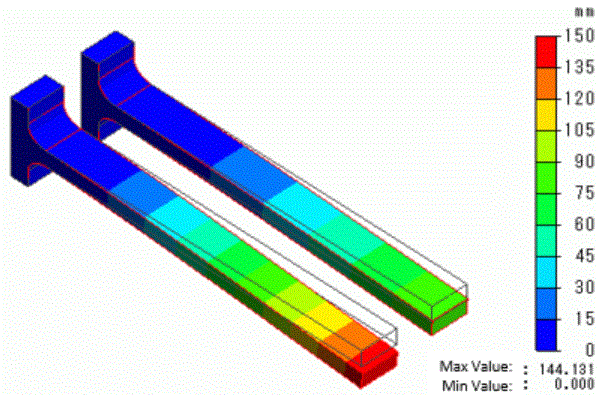
The cantilever made of the elasto-plastic material (body number 2) has lager displacements than the other (body number 3) made of the elastic material.
Below is the displacement at the step 2, the unloading step. The contour diagram shows the magnitude of displacement.
True Scale is selected on the Displacement Diagram tab of Graphics Setup.

After released from the gravity, the elastic cantilever (body number 3) does not exhibit any displacement, while the elasto-plastic cantilever (body number 2) does due to the plastic strains.
Plastic strain vectors at the step 1 are shown below.
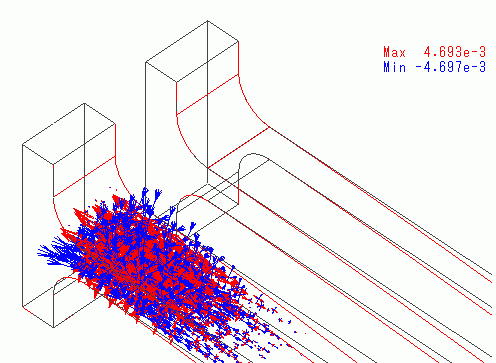
Some plastic strains remain near the fixed end of the elasto-plastic cantilever while no strain remains in the elastic cantilever.
The vectors of the stress at step 1 and step 2 (unloading step) are shown below.
Step 1

Step 2 (Unloading step)
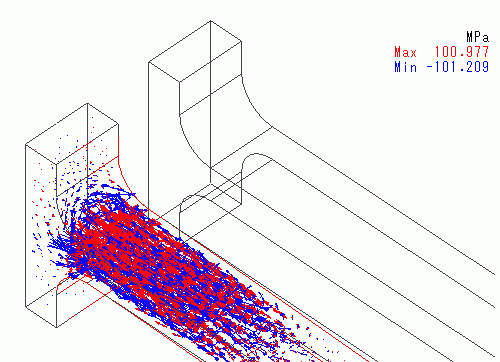
Some stresses remain in the elasto-plastic cantilever (body number 2) after the load is removed due to the remaining plastic strains.