Home / Examples / Stress Analysis [Galileo] / Example 33: Analysis of an Fallen Object
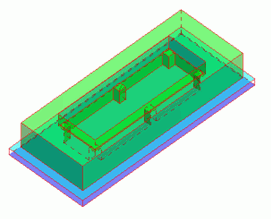
An object consisting of a substrate and a frame falls onto the floor and bounces off. The transient analysis is performed.
The deformation, the displacement distribution, and the stress distribution are solved.
Unless specified in the list below, the default conditions will be applied.
The stress transient analysis is available in an optional package.
Item |
Settings |
Analysis Space |
3D |
Model Unit |
mm |
Item |
Settings |
Solver |
Stress analysis [Galileo] |
Analysis Type |
Transient Analysis |
Large deformation |
Large Displacement |
Options |
Select [Acceleration]. |
The acceleration, the transient analysis, and the high-level setting tabs are set up as follows .
Tab |
Setting Item |
Settings |
Acceleration |
Acceleration |
(X,Y,Z) = (0, 0, -9.8) [m/s2] |
Transient analysis |
Timestep |
0.0005 [sec] |
Calculation Steps |
20 |
|
Output Interval |
1 |
The object falls from the height of 1.5 [m].
The calculation begins when the object is positioned 0.001 [m] above the floor, with an initial velocity of -5.420369 [m/s].
The frame and the substrate are solid bodies. The floor is a rigid body.

Body Number/Type |
Body Attribute Name |
Mesh Size |
Material Name |
9/Solid |
FRAME |
10 |
001_Al * |
10/Solid |
SUB |
5 |
008_Cu * |
11/Solid |
RIGID |
|
Rigid |
* Available from the Material DB
Material property of the rigid body is set up as follows.
Material Name |
Tab |
Settings |
Rigid |
Elasticity |
Young's Modulus: 1.0e20 [Pa] Poisson's Ratio: 0.0 |
Density |
1000 [kg/m3] |
Initial velocities are set in the body attributes.
Body Attribute Name |
Tab |
Settings |
FRAME |
Initial Velocity |
(X,Y,Z) = (0, 0, -5.420369) [m/s] |
SUB |
Initial Velocity |
(X,Y,Z) = (0, 0, -5.420369)[m/s] |
The bottom face of the frame makes a contact with the top face of the rigid floor.
The displacement of the rigid floor is set to zero, because it is fully fixed.
Boundary Condition Name/Topology |
Tab |
Boundary Condition Type |
Settings |
Contactor/Face |
Mechanical |
Contact Surface |
Contact Surface Classification: Contactor Surface |
Target/Face |
Mechanical |
Contact surface |
Contact Surface Classification: Contactee Surface |
Fix/Face |
Mechanical |
Displacement |
Select UX, UY, and UZ all. Set all components to zero. |
* After setting the contact surface, go to the [Model] tab,
and click [Boundary Pair]  . Pair "Contactor" and "Target" in the Boundary Pair dialog box.
The general mesh size is set to 14.
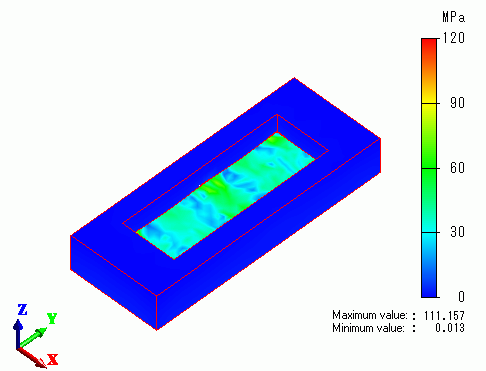
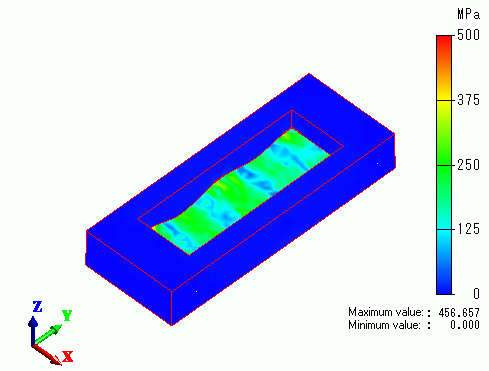
The contour diagrams below show von Mises equivalent stress. Note that [Set Emphasizing Scale] is set to 10 on the Displacement Diagram tab of [Graphics Setup].
The rigid body is hidden.
The moment of the collision (t = 0.0002 [sec])
0.0001 sec after the collision (t = 0.0003 [sec])
0.0003 sec after the collision (t = 0.0005 [sec])
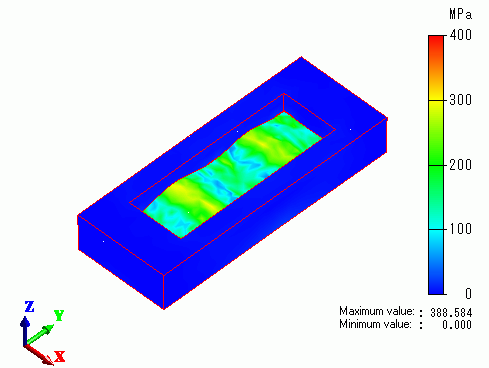
These diagrams show that the substrate deforms as time passes since the collision.