Home / Examples / Stress Analysis [Galileo] / Example 37: Plastic Deformation due to Repetitive Displacement
Repetitive displacement is applied on the tip of a cantilever of elasto-plastic material.
Multi-steps are set up.
By giving time dependency to the displacement boundary of the tip of the cantilever, repetitive displacement is set up.
The elimination or death of bodies can be set in the multi-step analysis. In this example, the tip of the cantilever disappears at the last step together with the displacement boundary.
ON/OFF setting in the boundary condition will give the same results.
* Analysis model with ON/OFF set in the boundary condition is also included in the project file.
Unless specified in the list below, the default conditions will be applied.
Elasto-plastic analysis is available in an optional package.
Item |
Settings |
Analysis Space |
3D |
Model Unit |
mm |
Item |
Settings |
Solver |
Stress Analysis [Galileo] |
Analysis Type |
Static Analysis |
Large Deformation |
Select [Large Displacement]. |
The Step/Thermal Load tab is set as follows.
Tab |
Setting Item |
Settings |
|||||||||||||
Step/Thermal Load |
Step Setting |
Multiple Steps |
|||||||||||||
Step/Reached Temperature Setting |
|
||||||||||||||
Options for the Multi-Step Analysis |
Save the results of substeps : Select |
The number of steps is 6. The number of substeps varies depending on the time-dependent weighting.
It is set to 10 on the substeps with the largest displacement.
By selecting [Save results of substeps], the results at substeps can be output.
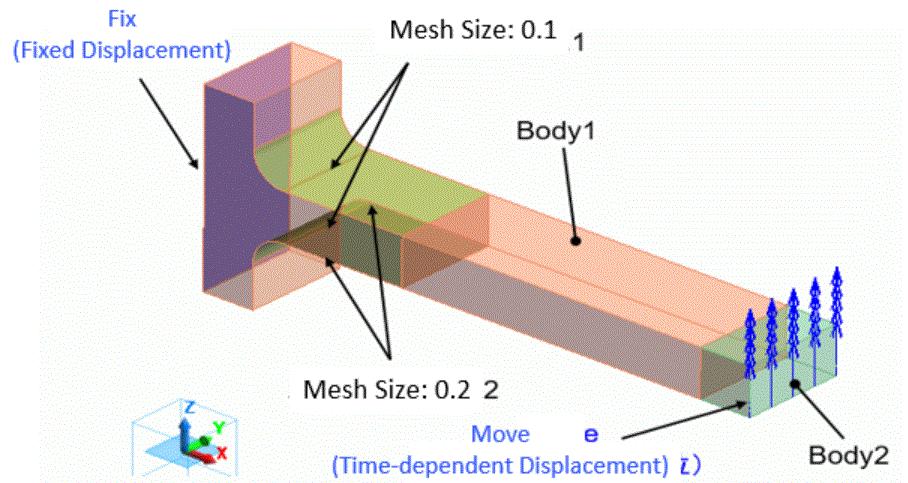
One end of the cantilever is fixed, while the other end is free and displaced forcibly.
The stress is concentrated at the fixed end. Therefore the finer mesh size is set around there.
The bar consists of two parts: One is the tip of the bar and the other is the main portion of the bar. The tip of the bar is to disappear at the last step.
Body Number/Type |
Body Attribute Name |
Material Name |
2/Solid Body |
Body2 |
ElastoPlasticMaterial |
3/Solid Body |
Body1 |
ElastoPlasticMaterial |
The material properties are set up as follows:
Material Name |
Tab |
Properties |
ElastoPlasticMaterial |
Elasticity |
Material Type: Elasto-plastic/Bilinear Hardening Law: Isotropic Hardening
Material Property: Young's Modulus 1x10⁹ [Pa] Poisson's Ratio 0.3 Strain Hardening Rate 0.05x10⁹ [Pa] Initial yield Stress 4x10⁶ [Pa]
|
Body2 is to die at Step 6, which can be set on the Analysis Domain tab as follows.
Body Attribute Name |
Tab |
Settings |
Body2 |
Analysis Domain |
Death Step: Step 6 |
Boundary Condition Name/Topology |
Tab |
Boundary Condition Type |
Settings |
Fix/Face |
Mechanical |
Displacement |
Select all X/Y/Z components. UX=0, UY=0, UZ=0 |
Move/Face |
Mechanical |
Displacement |
Select the Z component. Uz=-0.25x10⁻³ [m]
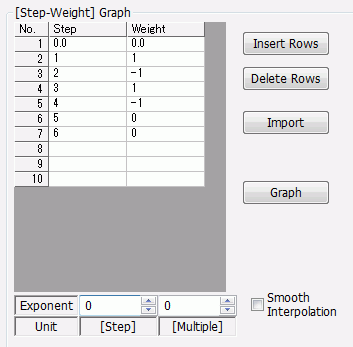
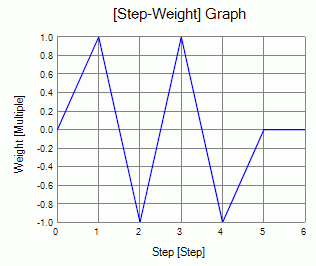
Select [Time Dependency] and set the weight function as follows.
With the weight setting above, the displacement is forcibly applied for 2 cycles.
|
The accumulated equivalent plastic strain at the final state which is step 6 is shown below.
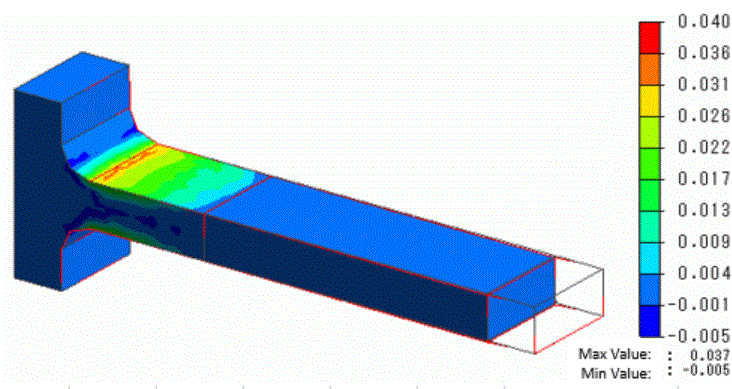
Plastic strains are concentrated at the fixed end of the cantilever.
The accumulation of strains over time is clear as shown below.

The plastic strains accumulate over time.
Distributions of the principal stresses at steps 5 and 6 are shown below.
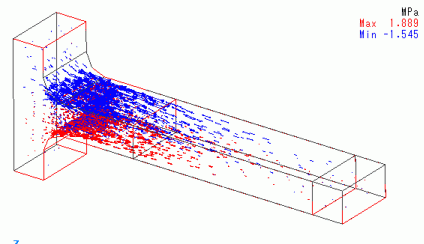
The principal stress at step 5
At the step 5, as the Z displacement at the tip of the bar has returned to 0 from minus direction, the top side is getting the compressive force, while the bottom side is getting the tensile force.
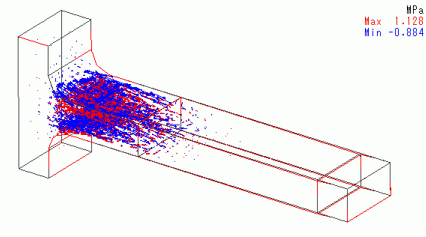
The principal stress at step 6
At step 6, the tip of the bar has disappeared. There are the residual stresses at the fixed end.