Home / Examples / Stress Analysis [Galileo] / Example 58: Spring Back Analysis with ON/OFF Setting
Analysis is performed on a plate which is bent in 90° angle and then released.
Procedure for the release after the 90° bent is set by applying [ON/OFF] setting of the boundary condition.
The same results will be given by selecting [Add unloading step] for the single step.
(Analysis model with the unloading setup is also included in the project file)
The elasto-plastic material is used. The plastic deformation will take place at the bending and the material will go backward to the original position in a small degree after the release.
(This nature is called spring back)
Unless specified in the list below, the default conditions will be applied.
Elasto-plastic analysis is available in an optional package.
Item |
Settings |
Analysis Space |
2D |
Model Unit |
mm |
Select [Large displacement] in the Large Deformation as deformation of 90° is large.
Item |
Settings |
Solver |
Stress Analysis [Galileo] |
Analysis Type |
Static Analysis |
Large Deformation |
Select Large Displacement |
Set up as follows on the Step/Thermal Load tab.
Step 1 corresponds to Bend 90°, and Step 2 corresponds to Release (set off the constrain of rotational displacement).
Tab |
Setting Item |
Settings |
|||||
Step/Thermal Load |
Step Setting |
Multiple Steps |
|||||
Step/Reached Temperature Setting |
|
||||||
Options for the Multi-Step Analysis |
Select Save the results of substeps |
The setting below is done on the High-level setting tab.
[Adjust acceleration/deceleration coefficient automatically] is not selected for this model to have faster calculation.
Tab |
Item |
High-Level Setting |
Nonlinear Analysis Deselect [Adjust acceleration/deceleration coefficient automatically] |
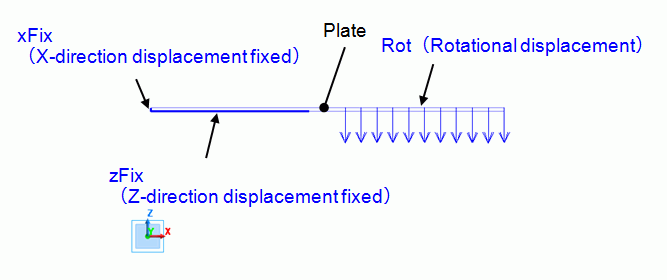
The model is a box solid body with an edge length of 200 mm. The material is elasto-plastic.
Fix the left end in the x-direction and fix the 90 mm edge area of the left end at its bottom side in the z-direction.
To bend it at its center in a 90-degree angle, set the rotational displacement to the 90 mm edge area on the top side of the right end.
Set the general mesh size at 1.
Body Number/Type |
Body Attribute Name |
Material Name |
0/Solid |
PLATE |
PlasticMat |
1,2/Face |
No Setup *1 |
No Setup *1 |
*1 Imprinting body for the boundary condition.
Material Name |
Tab |
Properties |
PlasticMat |
Elasticity |
Material Type: Elasto-plastic Bilinear Material Property: Young's Modulus: 200x109 [Pa] Poisson's Ratio: 0.3 Strain Hardening Rate: 20x109 [Pa] Initial Yield Stress: 200x106 [Pa] |
Rotational displacement and ON/OFF are set.
Boundary Condition Name/Topology |
Tab |
Boundary Condition Type |
Settings |
||||
xFix/Face |
Mechanical |
Displacement |
Select the X component. |
||||
zFix/Face |
Mechanical |
Displacement |
Select the Z Component. |
||||
Rot/Face |
Mechanical |
Rotational Displacement |
Coordinates on the Axis Vector of the Axis Rotation Angle |
||||
Set ON/OFF |
Select |
||||||
ON/OFF List |
Boundary Condition ON/OFF Tab
*1 |
*1) If [Weight function] tab is selected in the Time/Step Table of ON/OFF List, the loads at the substeps can be viewed.
The figure below is the view when [Show with actual loads] is selected.
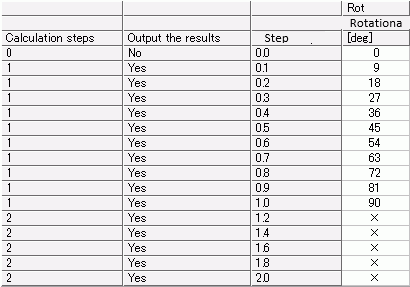
The set rotational displacement will gradually reach to 90[deg] in one step.
It goes up by 4.5[deg] per substep as the number of substeps is 10.
Since OFF (No) is set on the step 2, the constrain of rotational displacement is removed from the first substep in the step 2 onward.
See [Weight Function Setting] for the details of viewing the weight function.
The results of all torques are shown in the table.
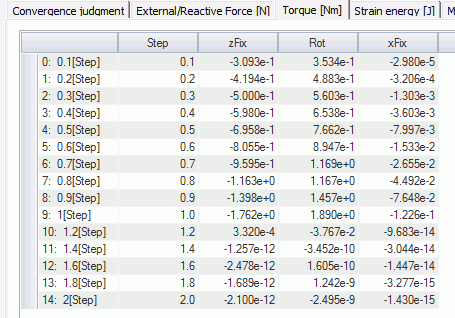
The data in the table are shown in the chart below.
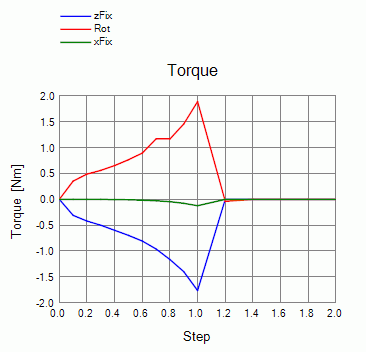
The torque applied to the Rot boundary increases up to 1 step
and then goes to almost zero at the first substep, 1.2 [Step], in the second step.
Right after removing the constrain, minute value is observed because the convergence judgment is a bit inaccurate.
But from the following substep onward, the torque is almost zero.
The displacement at the 1st step is shown below. The contour diagram shows the magnitude of displacement.
The 90° bending is observed.
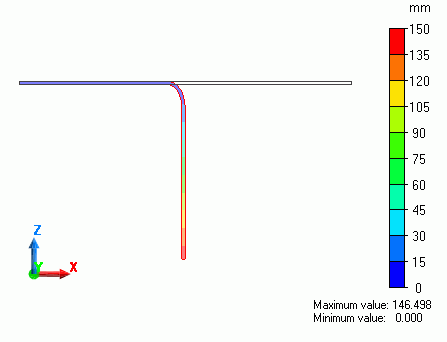
The displacement at the 2nd step is shown below.
The bending angle is smaller than in the step 1 due to the removal of the constraint of rotational displacement.
It indicates a spring back phenomena.