General
Home / Examples / Stress Analysis [Galileo] / Example 60: Warp of Substrate in the Cooling Process of Resin
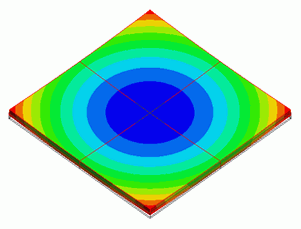
Epoxy resin is coated on an alumina substrate and cured at 200℃ and then the substrate is cooled down to 25℃.
The warp caused by the difference in thermal expansion coefficient between alumina and epoxy resin in the cooling process is solved.
A resin material is used whose physical properties change greatly at the glass transition temperature of 140℃. It is generally recommended to treat such material as viscoelastic material.
In this example, the following three material models will be compared: 1) viscoelasticity, 2) elasticity, and 3) viscoelasticity (simple setting).
See [Analysis of Viscoelastic Materials] and [Viscoelasticity (Simple setting)] for more details.
The deformation, the displacement distribution and the stress distribution are solved.
Unless specified in the list below, the default conditions will be applied.
Results will vary depending on Femtet version and the PC environment.
Item |
Settings |
Analysis Space |
3D |
Model Unit |
mm |
The temperature is applied evenly on the model.
Select Thermal Load and set the reference temperature and the reached temperature.
There is no need to couple with the thermal analysis [Watt].
Item |
Settings |
Solver |
Stress Analysis [Galileo] |
Analysis Type |
Static Analysis |
Options |
Select Thermal Load |
For the models 1) viscoelasticity and 3) viscoelasticity (simple setting), Step/Thermal Load tab is set as follows.
Cooling speed is 1℃/s from 200℃ to 25℃. To perform analysis every 5℃, set Time to 175 and Substeps to 35.
Tab |
Setting Item |
Settings |
|||||||
Step/Thermal Load |
Time Setting |
Set up |
|||||||
Reference Temperature |
200 [deg] |
||||||||
Step/Reached Temperature Setting |
|
||||||||
Options for the Nonlinear Analysis |
Save the results of substeps : Select |
For the model 3) elasticity, the setting is as follows.
Tab |
Setting Item |
Settings |
|||||||
Step/Thermal Load |
Step Setting |
Multi-step thermal load analysis |
|||||||
Time Setting |
Set up |
||||||||
Reference Temperature |
200 [deg] |
||||||||
Step/Reached Temperature Setting |
|
||||||||
Options for the Multi-Step Analysis |
Save the results of substeps : Select |
This model consists two boxes for alumina substrate and epoxy resin.
We set the symmetric boundary conditions in X and Y directions.
To solve the amount of warp, displacement of the center is fixed for reference.

Body Number/Type |
Body Attribute Name |
Material Name |
0/Solid |
board |
001_Alumina * |
1/Solid |
resin |
1. Viscoelast_Mat |
(*) Available from the material DB
Material setting is done as follows with the data of dynamic modulus.
See [Converting the Measurement Data of Viscoelastic Materials] for the measurement data of the dynamic modulus.
Material Name |
Tab |
Properties |
Viscoelast_Mat |
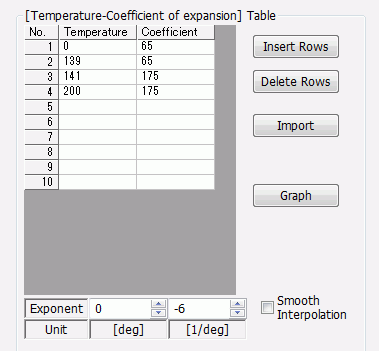
Coefficient of Linear Thermal Expansion |
Temperature Dependency: Yes
|
Viscoelasticity |
Defined by: Dynamic Modulus [temp/freq response] Relaxation Table : Use the csv file below. Viscoelast_Mat.csv |
|
Elsat_Mat |
Coefficient of Linear Thermal Expansion |
Same as Viscoelast_Mat |
Elasticity |
Temperature Dependency: Yes Material Type: Elastic The file below is obtained using the storage modulus measured at 1Hz and Poisson's ratio of 0.3. Elast_Mat.csv |
|
SimpleViscoelast_Mat |
Coefficient of Linear Thermal Expansion |
Same as Viscoelast_Mat |
Elasticity |
Temperature Dependency: Yes Material Type: Viscoelasticity Setting by: Table Poisson's Ratio: 0.3 Glass Transition Temperature (Tg): 140 [deg] Enter the storage modulus measured at 1Hz, which is in the csv file below, into the table. |
Displacement and face of symmetry are set as follows.
Boundary Condition Name/Topology |
Tab |
Boundary Condition Type |
Settings |
Fix_all/Vertex |
Mechanical |
Displacement |
Select all X/Y/Z components |
Sym_x/Face |
Symmetry/Continuity |
Symmetry |
Select Reflective |
Sym_y/Edge |
Symmetry/Continuity |
Symmetry |
Select Reflective |
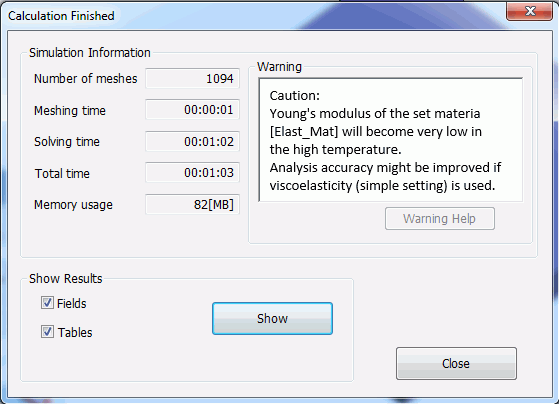
At the end of the analysis of model 2), the warning message will appear as below recommending to use the model 3).
With the following field graph setting, the Z displacements at the tip of substrate are displayed.
Select Horizontal axis: Mode (frequency, time, step, etc) for Type and select Horizontal axis: Temperature.
Coordinates: (5, 5, 0.4)
Mode: 0-34
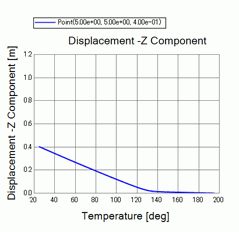
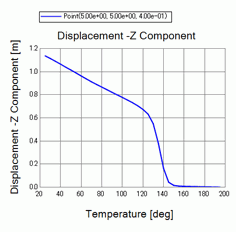
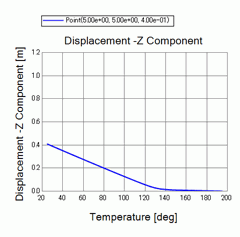
The results are shown below. The maximum value of the vertical axis is 1.2 mm to compare the three models.
| 1) Viscoelasticity | 2) Elasticity | 3) Viscoelasticity (Simple setting) |
|
|
|
Comparing models 1) Viscoelasticity and 2) Elasticity, 2) shows larger warp of around 1.15 mm while 1) is around 0.4 mm.
Model 3) Viscoelasticity (Simple setting) shows the same value of 0.4 mm as model 1).
If time-dependency data of elasticity is used for analysis, 3) Viscoelasticity (Simple setting) will give accurate results as the warning message above indicates.