General
Home / Examples / Stress Analysis [Galileo] / Example 69: Simplified Model for Bracket Analysis Using Remote Load
How to simplify an analysis model by using a remote load is explained.
A remote load is used if a torque load is taken into account as well as a distributed load.
Unless specified in the list below, the default conditions will be applied.
Results will vary depending on Femtet version and the PC environment.
Item |
Settings |
Solver |
Stress Analysis [Galileo] |
Analysis Space |
3D |
Analysis Type |
Static Analysis |
Unit |
mm |
Analysis Options |
|
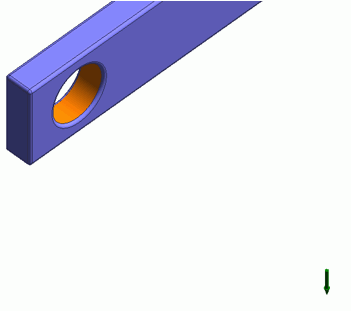
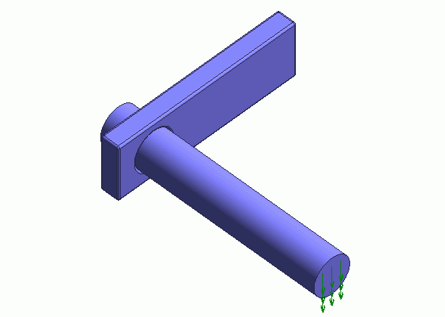
A load is applied to the bar of the model. The model can be simplified by using a remote load.
Body Number/Type |
Body Attribute Name |
Material Name |
0/Solid |
Body_Attribute_001 |
001_Al * |
* Available from the material DB
Boundary Condition Name/Topology |
Tab |
Boundary Condition Type |
Setting |
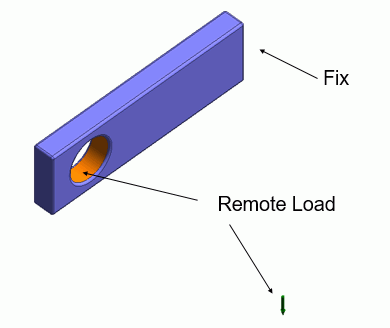
RemoteLoad/Face |
Mechanical |
Remote Load |
Coordinates of Remote Point X: 10×10^-3 [m] Y: -8×10^-3 [m] Z: 1.5×10^-3 [m] Remote Load X: 0.0 [N] Y: 0.0 [N] Z: -1.0 [N] |
Fix/Face |
Mechanical |
Displacement |
Ux: 0.0 Uy: 0.0 Uz: 0.0 [m] |
The displacement diagram is shown below. The contour diagram shows the magnitude of displacement. The unit is [m].
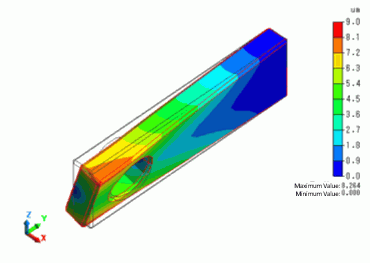
By setting a remote load, a torque displacement in the rotational direction is generated.