


|
Home / How to Set Body Attribute, Material Property and Boundary Condition / Body Attribute Tabs / Electrode Tab
Electrode Tab
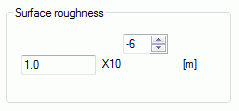
The surface roughness of the body is set on this tab.
It is selectable for the electromagnetic analysis [Hertz].
It is shown in the [Edit Body Attribute] dialog box. See [How to Set Body Attribute/Material Property].
- Solid Body
If "Conductor" is selected on the Conductivity tab of material and the thickness is judged to be more than twice
the skin depth, the mesher will set the conductor boundary condition on the surface.
The surface roughness is taken into account during this boundary condition calculation.
Therefore, if the thickness of the conductive body does not exceed twice the skin depth, and the mesher does not set the boundary condition on the conductor, the surface roughness is not taken into account.
If "Multilayer electrode" is selected on the Conductivity tab of material and only one layer is defined, the skin depth is taken into account.
- Sheet Body in 3D Analysis or Wire Body in 2D Analysis
The surface roughness is taken into account only when the following two conditions exist at the same time.
- "Ignore the influence of face/edge electrode thickness" is selected.
- Conductor is selected on the Conductivity tab of the material, or only one layer is defined even though multilayer electrode is selected.
|
Options |
Notes |
|
Surface Roughness |
Specifies the surface roughness (RMS). |