


|
Home / How to Set Body Attribute, Material Property and Boundary Condition / Body Attribute Tabs / Initial Temperature Tab
Initial Temperature Tab
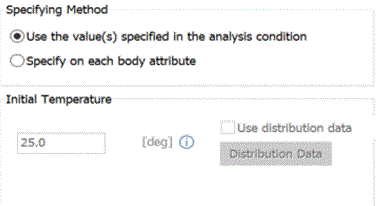
The initial temperature for the body is set on this tab.. It is for the thermal transient analysis.
It is shown in the [Edit Body Attribute] dialog box. See [How to Set Body Attribute/Material Property].
|
Setting Items |
Notes |
|
|
Specifying Method |
Apply the values specified for the analysis conditions |
The value set on the Transient Analysis tab of the Analysis Condition Setting is used.
|
|
Specify for each body attribute |
The initial temperature is set on each body attribute. |
|
|
Initial Temperature |
Enterable when Specify for each body attribute is selected.
Enter the initial temperature of the body attribute.
|
|
|
Use distribution data |
Enterable when Specify for each body attribute is selected.
Select Use distribution data
Click the Distribution Data button to open the dialog box.
|
|