


|
Home / How to Set Body Attribute, Material Property and Boundary Condition / Body Attribute Tabs / Initial Velocity Tab
Initial Velocity Tab
The initial velocity for the body is set on this tab. It is for the stress transient analysis. The stress transient analysis is available in an optional package.
It is shown in the [Edit Body Attribute] dialog box. See [How to Set Body Attribute/Material Property].
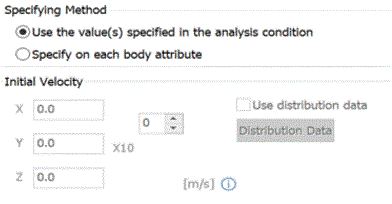
|
Setting Items |
Notes |
|
|
Specifying Method |
Apply the values specified for the analysis conditions
|
Applies the initial velocity set on the Transient Analysis tab in the Analysis Condition Setting. |
|
Set for each body attribute |
Sets the initial velocity for each body attribute. |
|
|
Initial Velocity Tab |
Settable if Specify for each body attribute is selected.
Sets the initial velocity to each body attribute. |
|
|
Use distribution data |
Settable if Specify for each body attribute is selected.
If Use distribution data is selected,
Click the Distribution Data button to open the dialog box. |
|