|
Home / How to Set Body Attribute, Material Property and Boundary Condition / Body Attribute Tabs / Rayleigh Damping Coefficients Tab
Coefficient of Rayleigh Damping Tab
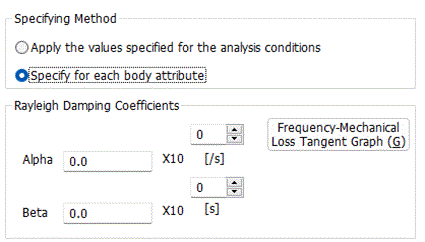
The coefficient of Rayleigh damping for the body is set on this tab.
It is shown in the [Edit Body Attribute] dialog box. See [How to Set Body Attribute/Material Property].
|
Setting Items |
Notes |
|
|
Specifying Method |
Apply the values specified for the analysis conditions |
The values set at Coefficient of Rayleigh Damping on the Transient Analysis tab of the analysis condition are used.
|
|
Specify for each body attribute. |
Set the coefficient of Rayleigh damping on each body attribute. |
|
|
Coefficient of Rayleigh Damping |
The coefficient of Rayleigh damping can be set for each body attribute in the stress transient analysis.
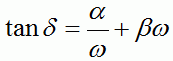
If Rayleigh damping is considered to be the damping effect on the frequency component of vibration,
Click Frequency-Mechanical loss tangent Graph to see the frequency response of mechanical loss tangent, where α is damping of low frequency vibration and β is damping of high frequency vibration. By setting β, you can remove noise of high-frequency vibration.
The detail of the coefficient of Rayleigh damping is explained at [Stress Transient Analysis] and [Mechanical Damping] in the Technical Notes.
(Note) The stress transient analysis is available in an optional package.
|
|