


|
Home / How to Set Body Attribute, Material Property and Boundary Condition / Body Attribute Tabs / Solid Tab
Solid Tab
The attributes relating to solid are set on this tab.
It is shown in the [Edit Body Attribute] dialog box. See [How to Set Body Attribute/Material Property].
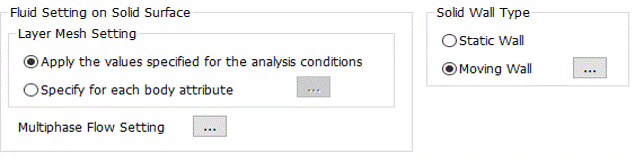
|
Setting Item |
Notes |
|
Layer Mesh Setting |
Allows to set the layer mesh of the fluid on the solid surface for each body attribute.
If [Specify for each body attribute] is selected and
|
|
Multiphase Flow Setting |
Sets the contact angle on the solid surface.
Click |
|
Solid Wall Type |
Sets the solid wall type on the solid surface.
Click |
 is pressed, [