


|
Home / How to Set Body Attribute, Material Property and Boundary Condition / Body Attribute Tabs / Stator/Rotor/Air Tab
Stator/Rotor/Air Tab
To be set for solving rotating machinery and translational machinery in the magnetic transient analysis.
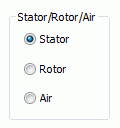
Either stator, rotor/mover. or air for the body is set on this tab.
The setting here is used for the following operation.
-
Sliding mesh creation
The details of meshing are explained at [Rotating machinery tab] and [Translational machinery tab]. -
Specify rotor in the torque calculation
It is shown in the [Edit Body Attribute] dialog box. See [How to Set Body Attribute/Material Property].
|
Setting Items |
Notes |
|
Stator/Rotor/Air |
Set either one of the following for body. For Rotating MachineryStator: Calculated as non-rotating body in the rotating machinery analysis.
Rotor: Calculated as rotating body. Calculate torque of the rotor body. Sliding meshes are created in the gap of stator and rotor. (The detail of meshing is explained at [Rotating machinery tab])
Air: Calculated as a body which is neither rotor nor stator. Used only when Air Domain Creation is deactivated and air is created manually.
For Translational MachineryStator: Calculated as non-moving body in the translational machinery analysis.
Mover: Calculated as a moving body in X direction. Calculates electromagnetic force (propulsion) of the body that is set as a mover. Sliding meshes are created in the gap of stator and mover. (The details of sliding mesh are explained at [Translational Machinery tab].)
Air: Calculated as a body which is neither mover nor stator. Used only when Air Domain Creation is deactivated and air is created manually.
|