


|
Home / How to Set Body Attribute, Material Property and Boundary Condition / Body Attribute Tabs / Thermal Load Tab
Thermal Load Tab
The thermal load for the body is set on this tab.
It is shown in the [Edit Body Attribute] dialog box. See [How to Set Body Attribute/Material Property].
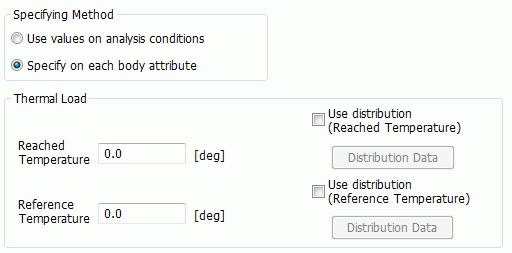
|
Setting Items |
Notes |
|
|
Specifying Method |
Selects either the conditions set on the step/thermal load tab or the conditions set for each body attribute. The following setting is ignored in the former case. |
|
|
Thermal Load |
Reached temperature |
It indicates the temperature after the heating or cooling.
If Use distribution data (Reached Temperature) is selected,
Click the Distribution Data button to open the dialog box.
|
|
Reference temperature (non-stress temperature) |
This is the temperature before the thermal deformation. No stress is present.
If you want to calculate the thermal stress when the model temperature changes from 20 deg to 100 deg uniformly, you don't need to use Watt. Set, for example, Reached temperature: 100 deg, Reference temperature: 20 deg.
If Use distribution data (Reference Temperature) is selected,
Click the Distribution Data button to open the dialog box. |
|