


|
Home / How to Set Body Attribute, Material Property and Boundary Condition / Body Attribute Tabs / Thickness/Width Tab
Thickness/Width Tab
The thickness and the width of the body are set on this tab.
It is shown in the [Edit Body Attribute] dialog box. See [How to Set Body Attribute/Material Property].
2D Analysis
|
Setting Item |
Notes |
|
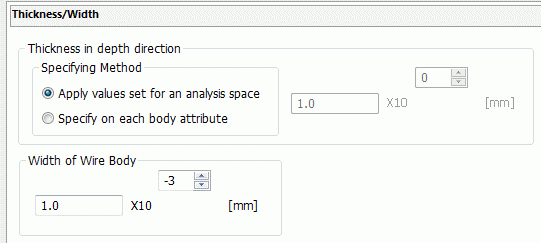
Thickness in Depth Direction |
Sets the thickness in the depth direction (Y-axis direction) for the 2D analysis. The detail is explained at Thickness of Sheet Body in 2D Analysis.
Specifying Method
Apply values set for an analysis space See [Analysis Space Setting] for the details. Select this option if you want to apply the same thickness to the bodies.
Specify for each body attribute Select this option if you want to apply different thicknesses to the bodies.
|
|
Width of Wire Body |
The width of wire body on XZ plane is specified. |
Axisymmetric Analysis
|
Setting Item |
Notes |
|
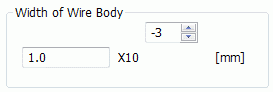
Width of Wire Body |
Sets the width of wire body on XZ plane. |
3D Analysis
|
Setting Items |
Notes |
|
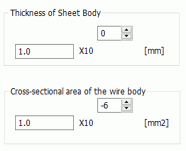
Thickness of Sheet Body |
Specifies the thickness of the sheet body. Calculation will take the specified thickness into account. |
|
Cross-sectional Area of Wire Body |
Specifies the cross-sectional area of wire body. Calculation will take the specified cross-sectional area into account. |