


|
Home / How to Set Body Attribute, Material Property and Boundary Condition / Periodic Boundary Condition
Periodic Boundary Condition
The periodic boundary condition can be set for electromagnetic, piezoelectric and electric, thermal, and electric-thermal analyses.
The setting is done in the following way.
-
Please note magnetic transient analysis (Luvens) does not require the setting here.
For detail, refer to [Symmetry/Continuity] tab.
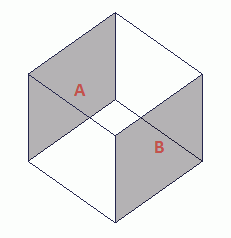
In order to make boundary conditions A and B periodic,
select Periodic on the Symmetry/Continuity tab for each.
On the [Model] tab, go to

and click [Boundary Pair]  .
.
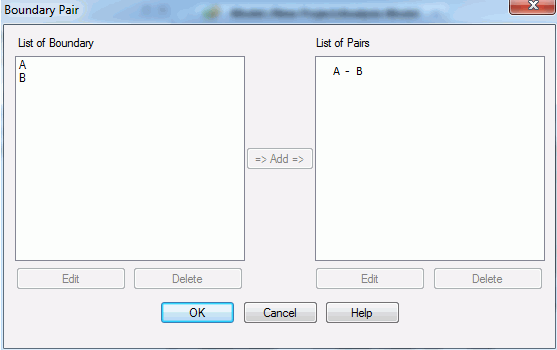
The [Boundary Pair] dialog box will appear.
|
Setting Items |
Notes |
|
List of Boundary Conditions |
Of the boundary conditions registered in the database, the list of those for the boundary pair will appear. Double click one. The [Edit Boundary Condition] dialog box will show up. To remove it from the list, press the [Delete] button. |
|
List of Pairs |
The registered pairs will be listed here. Double click one. The [Edit Boundary Pair] dialog box will show up and you can edit the data. (Position of the pair and phase difference can be edited for the periodic boundary) To remove it from the list, press the [Delete] button. |
|
Add |
Select the boundary conditions to pair up in the list and press the Add button. The [Edit Boundary Pair] dialog box will show up. Press the OK button to complete the pairing. |
|
Delete |
The boundary conditions can be removed from either list. |
|
Setting Items |
Notes |
|
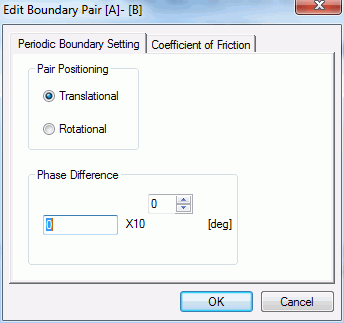
Pair Positioning |
If it is "rotational", the boundary condition will match to the other when rotated. If it is "translational", the periodic boundary cannot be set for other positionings. Rotation is not supported in the piezoelectric analysis. |
|
Phase Difference |
Indicates the phase difference of field value between the pair. |