


|
Home / How to Set Body Attribute, Material Property and Boundary Condition / Individual Setting of Radiation
Individual Setting of Radiation
The radiation between the faces is set.
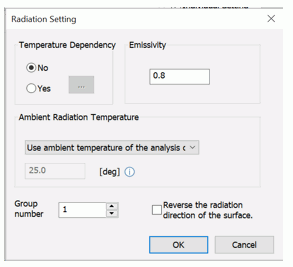
In the [Edit Boundary Condition] dialog box, go to Thermal tab and select individual setting, and click  .
.
|
Setting Items |
Notes |
||||||||
|
Temperature Dependency |
Selects [No] if the emissivity is not temperature dependent.
Selects [Yes] if the emissivity changes over the temperature.
Fill in the table.
|
||||||||
|
Emissivity |
Sets the emissivity when [No] is selected. |
||||||||
|
Ambient Radiation Temperature |
Sets the ambient radiation temperature.
|
||||||||
|
Group Number |
Settable when [Surface-to-surface (accuracy prioritized)] is selected in the radiation setting.
The radiation is calculated for the faces assigned with the same group number.
It is, therefore, not needed to change the default setting of 1. By grouping the faces where the radiation is not taking place, calculation time and memory usage may be reduced. |
||||||||
|
Reverse the radiation direction of the surface |
Settable when [Surface-to-surface (accuracy prioritized)] is selected in the radiation setting.
The radiation energy is typically emitted in the direction normal to the set surface.
In the 3D analysis, the radiation direction must be determined to calculate the radiation from the sheet body. Check if the boundary condition is set correctly on the results window. If the radiation surface direction is opposite to your wish, select this option.
|