|
Home / How to Set Body Attribute, Material Property and Boundary Condition / Material Property Tabs / Hyperelasticity Tab
Hyperelasticity Tab
The material's hyperelasticity is set on this tab.
Hyperelastic material can be set only when the analysis type is either static analysis or transient analysis and large displacement or large strain is selected on the Stress Analysis tab.
It is in the [Edit Material Property] dialog box. See [How to Set Body Attribute/Material Property].
See also technical note [Stress Analysis of Hyperelastic Materials].
(Note) Hyperelastic analysis is optional.
|
Setting Item |
Notes |
|
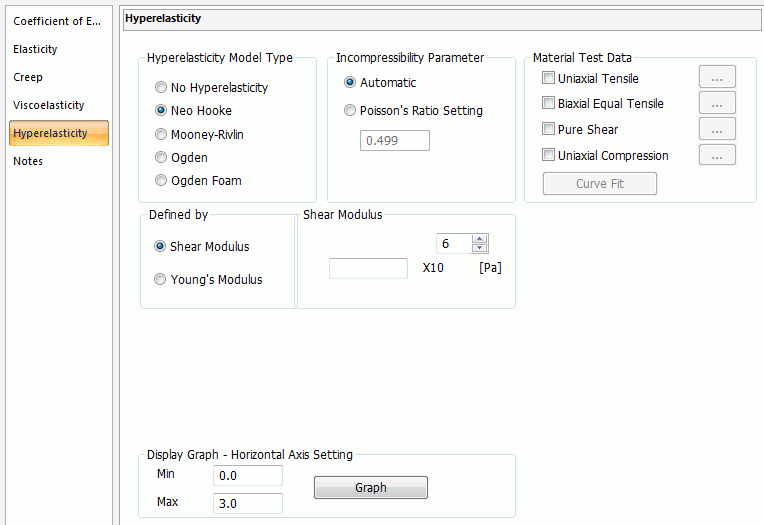
Hyperelasticity Model Type |
Selects from No Hyperelasticity, Neo Hooke, Mooney-Rivlin, Ogden, or Ogden Foam Material.
|
|
Incompressibility Parameter Mooney-Rivlin, Ogden) (Ogden Foam Material) |
Selects either Automatic or Poisson's Ratio Setting or Poisson's Ratio Setting.
If the hyperelasticity model type is Neo Hooke, Mooney-Rivlin, or Ogden
Generally, hyperelastic material is incompressible (its volume is not changed by deformation). Allowable volume change (minute compressibility) is determined by specifying Poisson's ratio. In the case of complete incompressibility, Poisson's ratio is 0.5. If nonlinear iterative calculation does not converge, it may converge by setting smaller Poisson's ratio.
If the hyperelasticity model type is Ogden Foam Material
It is used as a parameter to fit the curve from the material test data. If Automatic is selected, Poisson's ratio will be set at 0.
|
|
Material Property for Neo Hooke |
If Neo Hooke is selected, the dialog box below will appear.
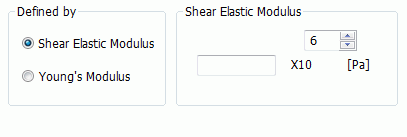
Enter either Shear elastic modulus or Young's modulus.
If Shear Elastic Modulus is selected, enter its value. If Young's Modulus is selected, enter its value.
Considering incompressibility, shear elastic modulus (G) and Young's modulus (E) are expressed as follows.
G = E / 3
Enter real number greater than 0 for the significand of shear elastic modulus and Young's modulus.
|
|
Material Property for Mooney-Rivlin |
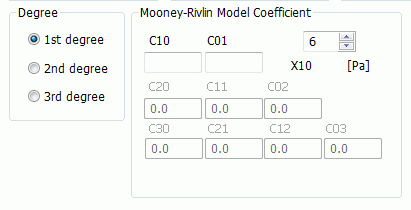
If Mooney-Rivlin is selected, the dialog box below will appear.
Fill in the Coefficient of Mooney-Rivlin Model
If 1st order is selected, enter C10 and C01. If 2nd order is selected, enter C10, C01, C20, C11, and C02. If 3rd order is selected, enter C10, C01, C20, C11, C02, C30, C21, C12, and C03.
Enter the value so as to make shear elastic modulus (1/2 * (C10 + C01)) become larger than 0 in the minute deformation.
|
|
Material property for Ogden Model |
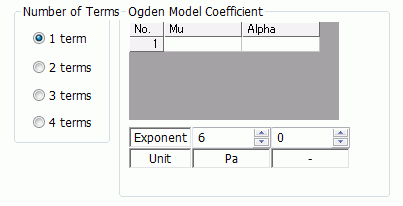
If Mooney-Rivlin is selected, the dialog box below will appear.
Enter the coefficient of Ogden model.
If 1 term is selected, enter μ1 and α1. If 2 terms is selected, enter μ1, α1, μ2, and α2. If 3 terms is selected, enter μ1, α1, μ2, α2, μ3, and α3. If 4 terms is selected, enter μ1, α1, μ2, α2, μ3, α3, μ4, and α4.
Significand of α is a real number other than 0. Enter the value to make shear elastic modulus (1/2 * Σ μi * αi) in the minute deformation becomes greater than 0.
|
|
Material Property for Ogden Foam Material |
If Ogden Foam Material is selected, the dialog box below will appear.
Enter the Coefficient of Ogden Foam Material Model
If 1 term is selected, enter μ1 and α1, and β1. If 2 terms is selected, enter μ1, α1, β1, μ2, α2, and β2. If 3 terms is selected, enter μ1, α1, β1, μ2, α2, β2, μ3, α3, and β3. If 4 terms is selected, enter μ1, α1, β1, μ2, α2, β2, μ3, α3, β3, μ4, α4, and β4.
Significand of α is a real number other than 0. Enter the value to make shear elastic modulus (1/2 * Σ μi * αi) in the minute deformation becomes greater than 0.
|
|
Material Test Data |
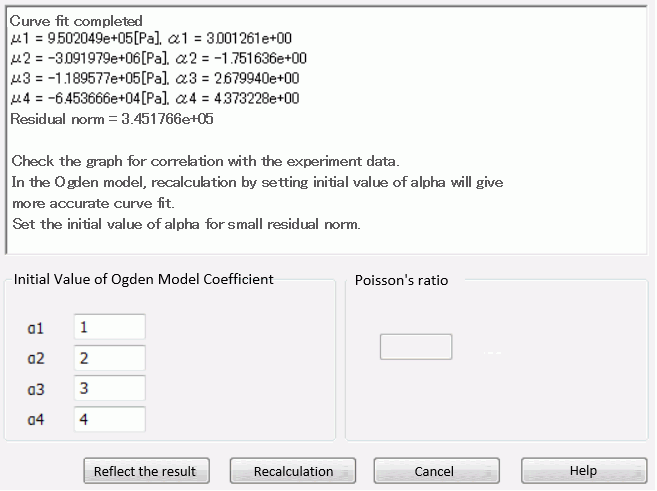
By registering the material test data, coefficient to represent each data with accuracy Uniaxial tensile, biaxial equal tensile, and pure shear, and uniaxial compression test data can be registered. If multiple test data is registered, the coefficient will be calculated so as to show all data. Select the data of your interest and click
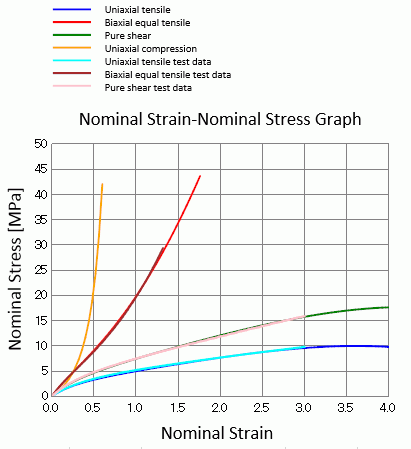
After registering the material test data, press Curve Fit. Check the graphe for correlation with the experiment data and if there is no problem, press Reflect the result. Curve fit results will be reflected in the dialog box.
|
|
Display Graph |
Press Graph button to view graphs of Nominal Strain-Nominal Stress and Nominal Strain-Nominal Energy Density. For Ogden foam material model, Poisson's ratio can also be viewed in the graph.
|
 .
.