


|
Home / How to Set Body Attribute, Material Property and Boundary Condition / Material Property Tabs / Piezoelectricity Tab
Piezoelectricity Tab
The material's piezoelectricity is set on this tab.
It is in the [Edit Material Property] dialog box. See [How to Set Body Attribute/Material Property].
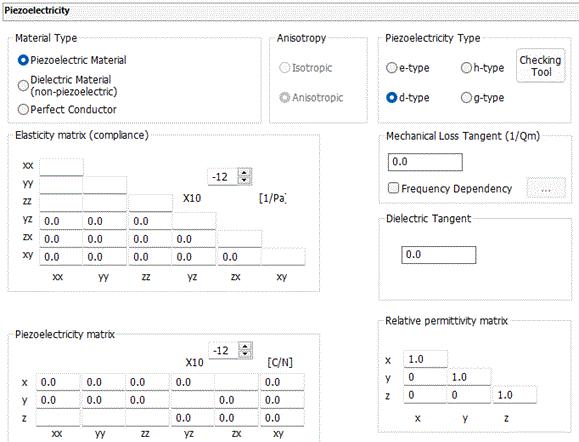
|
Setting Items |
Notes |
|
Material Type |
Selects one from Piezoelectric Material, Dielectric Material (non-piezoelectric) and Perfect Conductor.
Piezoelectric Material: A dielectric material with piezoelectricity Dielectric Material (non-piezoelectric): A dielectric material without piezoelectricity Perfect Conductor: Conductor is not available in the piezoelectric analysis. Select the perfect conductor.
|
|
Anisotropy |
Selects either Isotropic or Anisotropic. |
|
Piezoelectricity Type |
Selectable if Piezoelectric Material is opted for. Select piezoelectricity type from e, g, h, or d. (Please refer to piezoelectric equations for the details.) Enter piezoelectricity, elastic modulus, and relative permittivity according to the selected type. If e-type is selected, for example, the elasticity and the permittivity, in addition to the piezoelectricity, have to be e-type.
Checking Tool is to convert to the other material properties by changing the type of equation of piezoelectricity.
|
|
Elasticity Matrix Type |
If an opted material type is other than Piezoelectric Material, the following options will show up. The options are effective if Anisotropic is selected in the anisotropy setting. If Isotropic is selected, the options will be ignored.
Select either Stiffness [Pa] or Compliance [1/Pa].
|
|
Elasticity |
If Anisotropic is selected in the anisotropy setting, enter the elasticity matrix. If Isotropic is selected in the anisotropy setting, enter Young's modulus and Poisson's ratio.
Depending on the elasticity type, the entry format could be stiffness or compliance.
The significand is a real number equal to or greater than 0. However, 0 is not allowed for the diagonal component (i, i ) where i=xx,yy,zz,xy,yz,zx.
|
|
Piezoelectricity Matrix |
The entry format depends on the piezoelectricity type.
|
|
Mechanical Loss Tangent (1/Qm) |
Enters the reciprocal of Qm (mechanical quality factor).
There are several parameters to specify the damping. For each parameter, enter the following value in 1/Qm.
1) Loss factor η (Mechanical loss tangent, tanδ): Enter the value of η or tanδ. 2) Damping ratio ζ: Enter the value of ζ multiplied by 2. 3) Coefficients of Rayleigh damping α and β: Enter the value of α/ωi + βωi (ωi is resonant frequency.)
See Mechanical Damping for various coefficients of damping.
Frequency Dependency: Selectable when the frequency sweep is discrete sweep or parallel discrete sweep in the piezoelectric-harmonic analysis. If selected, [Frequency-Mechanical Loss Tangent] table will show up by clicking Enter the frequency and the corresponding mechanical loss tangent here. |
|
Dielectric Tangent |
See Complex Permittivity.
|
|
Relative Permittivity Matrix |
Enterable when either e-type or d-type is selected. The significand is a real number equal to or greater than 0. For the diagonal component (i, i ), 0 is not allowed where i=x, y, z.
|
|
Inverse Relative Permittivity Matrix |
Enterable when either g-type or h-type is selected. |


![[Frequency-Mechanical Loss Tangent] table](Frequency-QmInv.gif)