


|
Home / How to Set Body Attribute, Material Property and Boundary Condition / Material Property Tabs / Porous Sound-absorbing Material Tab
Porous Sound-absorbing Material Tab
The material property of porous sound-absorbing material is set on this tab.
The tab is selectable for the acoustic-harmonic analysis.
It is in the [Edit Material Property] dialog box. See [How to Set Body Attribute/Material Property].
|
Setting Item |
Notes |
|
Porous Sound-absorbing Material |
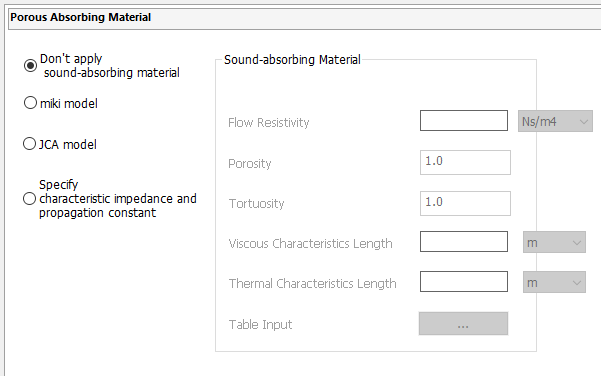
If [Don't apply sound-absorbing material] is selected, entering data is not required on this tab. Entered data will be ignored. Other options are available when the frequency sweep is discrete sweep or parallel discrete sweep, in the acoustic harmony analysis.
[miki model] Enter flow resistivity, porosity, and tortuosity.
[JCA model] Enter flow resistivity, porosity, tortuosity, viscous characteristics length, and thermal characteristics length.
[Characteristic Impedance and Propagation Constant Input] Click [Table Input] and enter the frequency response into the table. The frequency of interest for analysis must be included in the range of input frequencies.
See the technical note: [Porous Sound-absorbing Material Model] for more information.
|