


|
Home / How to Set Body Attribute, Material Property and Boundary Condition / Material Property Tabs / Viscoelasticity Tab
Viscoelasticity Tab
The material's viscoelasticity is set on this tab.
Viscoelastic material can be set only in the following cases where
1. Static analysis is selected on the Stress Analysis Tab and [Set up ] is selected for the Time setting on the Step/Thermal Load tab
2. Transient analysis is selected on the Stress Analysis tab.
3. Harmonic analysis is selected on the Stress Analysis tab.
4. Harmonic analysis is selected on the Piezoelectric Analysis tab.
It is in the [Edit Material Property] dialog box. See [How to Set Body Attribute/Material Property].
See also [Analysis of Viscoelastic Materials].
(Note) Viscoelastic analysis is optional.
|
Setting Item |
Notes |
||||||||
|
Defined by |
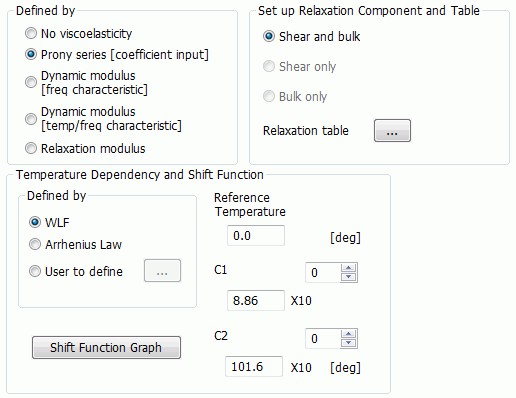
Selectable from No viscoelasticity, Prony series [coefficient input], Dynamic modulus [freq response], Dynamic modulus [temp/freq characteristics], and Relaxation modulus.
|
||||||||
|
Relaxation Type |
Enterable for Prony series [coefficient input], Dynamic modulus [freq characteristics], Dynamic modulus [temp/freq response], and Relaxation modulus.
Available types are Shear and bulk, Shear only, and Bulk only.
|
||||||||
|
Relaxation Table (Prony Series) |
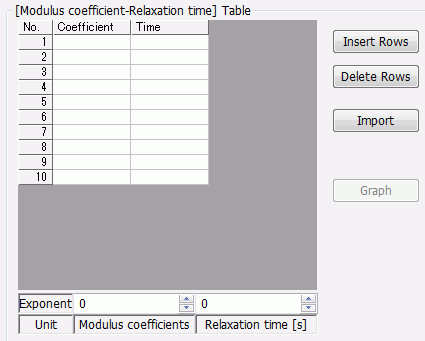
By clicking the Relaxation table button for Prony series [coefficient input]., the dialog box below will appear. Enter Coefficient of modulus βi and Relaxation time Ti [s]. The sum of βi needs to be 1 or less.
See [Analysis of Viscoelastic Materials] for more details of Prony series.
Click the Graph button to see the relaxation modulus with time and
|
||||||||
|
Relaxation Table (Dynamic Modulus) |
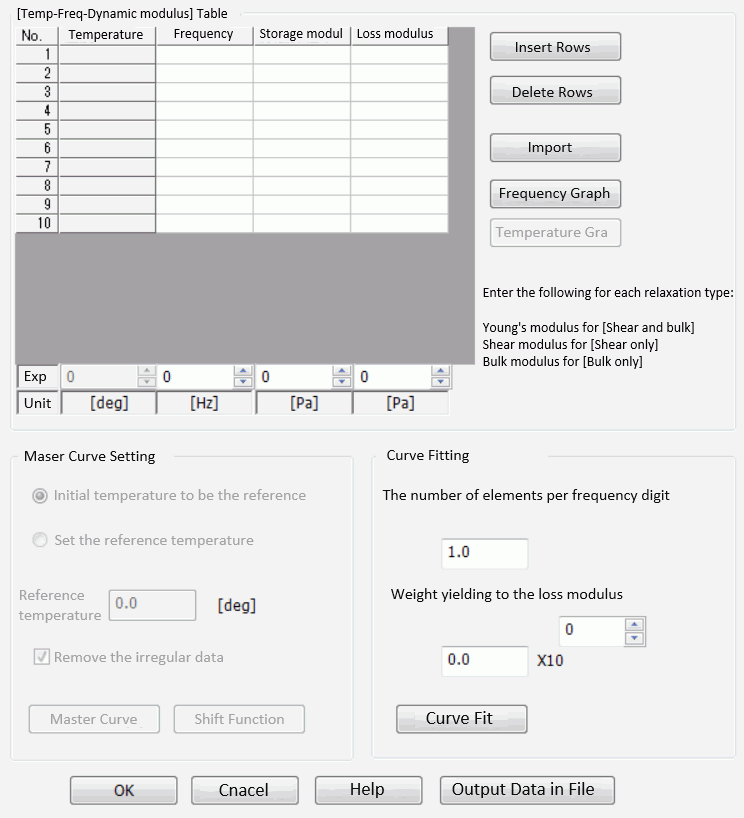
By clicking the Relaxation table button for Dynamic modulus[freq characteristics] and Dynamic modulus[temp/freq response], the dialog box below will appear.
- In the case of Dynamic modulus [freq response]
Fill in the table with the data of Frequency, Storage modulus and Loss modulus.
These moduli are interchangeable
- In the case of Dynamic modulus [temp/freq response]
In most cases, material property of viscoelastic material is measured with dynamic moduli (storage and loss) over temperatures and frequencies. Measured data can be directly entered. Fill in the table with the data of Temperature, Frequency, Storage modulus and Loss modulus.
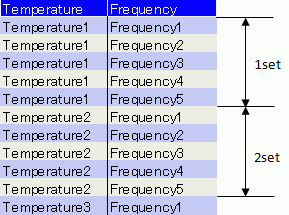
- Fill in either table depending on the relaxation type. - Frequencies can be entered either in incremental or decremental order, but do not mix the orders in the table. - Constant temperature is preferable for one set of data but the variation is allowed, in which case the average temperature will be treated as typical value. - Temperature should be either in incremental or decremental order in the table. Do not mix.
Example:
Press the Frequency Graph button to see the frequency characteristics of dynamic moduli (storage and loss)
The Temperature Graph button is selectable for Dynamic modulus[freq response]. You can see the temperature characteristics of dynamic moduli (storage and loss).
To understand Master Curve Setting and Curve Fitting fully, Use The default setting unless you are absolutely sure.
Reference temperature is required for master curve.
If [Remove irregular data] is selected,
Master Curve button will show the frequency characteristics of dynamic moduli (storage and loss).. Shift Function Graph button will show the temperature characteristics of shift factor.
The number of elements per frequency digit is used to calculate the number of elements for Prony series.
Weight yielding to the loss modulus can be set for better curve fitting. The default is 0 and no loss modulus is taken into account. If 1.0 is entered, storage and loss moduli are treated equally.
Curve Fit button will let you compare the original master curve and the curve-fitted master curve.
Output Data in File button will let you compare |
||||||||
|
Relaxation Table (Relaxation Modulus) |
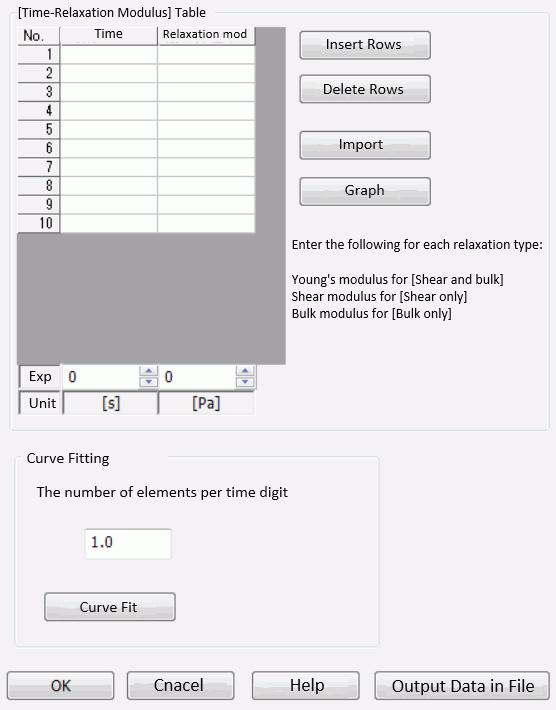
Buy clicking the Relaxation table button for Relaxation modulus, the dialog box below will appear.
Fill in the table with the data of time and relaxation modulus.
These moduli are interchangeable
The number of elements per time digit is used to calculate the number of elements for Prony series.
Curve Fit button will let you compare the input data and the curve-fitted relaxation modulus. (Time dependency graph of the relaxation modulus) Output Data in File will let you compare
|
||||||||
|
Temperature Dependency and Shift Function |
Selectable when Thermal load is selected in the Analysis Condition Setting dialog box and either Prony series [coefficient input] or Dynamic modulus [freq response] is selected on the Viscoelasticity tab.
Shift factor aT indicates the temperature dependency of relaxation time. Common logarithm is entered. For example, log10aT = -1 means the relaxation time is 1/10. See also [Analysis of Viscoelastic Materials].
Select one from WLF, Arrhenius law and User to define.
By clicking the Shift Function Graph button, the temperature dependency of the entered shift factor will be graphed.
|
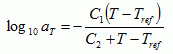
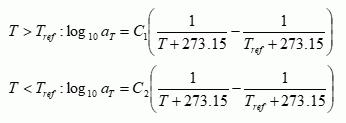
 to be clicked to open the [Temperature - Shift factor log10aT] table.