


|
Home / Modeling / CAD Data Import/Export / Setting Items at Import
Setting Items for Import
Go and click the [File] tab  , and select [Import CAD Data]
  . The [Import] dialog box will be activated.
See also [CAD Data Import/Export].
|
Parasolid |
DXF |
|
|
|
|
|
|
Gerber File (RS274 format) |
Drill Data File (Excellon format) |
|
|
|

|
Items |
Notes |
|
File Name |
Specifies the file name to import. |
|
File Type |
Selects the file type to import. |
|
Find minute shapes |
Tries to find minute shapes in the imported bodies. If found, they will be highlighted. The checking might take time if the imported bodies are complicated.
|
|
Yield to speed |
Does not try to find minute shapes. The import will be done faster. However, you might get errors during meshing if minute shapes exist.
|
|
Applies healing to the bodies in the modeling window after import.
|
|
|
Yield to assembly names |
Body attribute names and material property names are to inherit assembly names. This setting is ignored when importing DXF files.
|
|
Yield to component names |
Body attribute names and material property names are to inherit component names. Please note the handover rule mentioned above might not be valid for all the CAD software. This setting is ignored when importing DXF files.
|
|
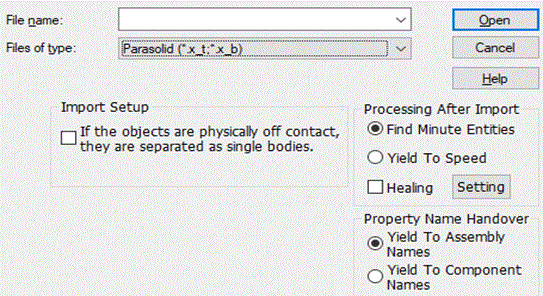
Setting for importing Parasolid files |
|
|
If the objects are physically off contact, separate them into single bodies. |
The bodies that are physically off contact are automatically separated into single bodies imported. |
|
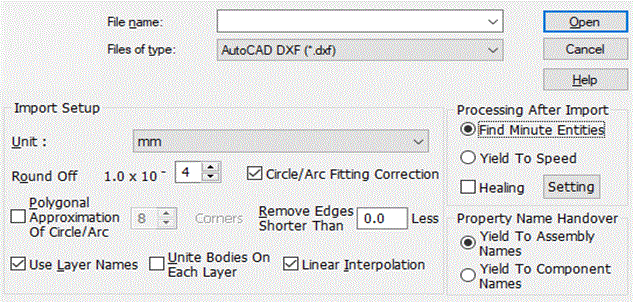
Setting for importing DXF files |
|
|
Unit |
The unit of the imported file is to be selected. |
|
Round off to [x] decimal digits |
The coordinates are rounded off to the decimal digits specified in the entry field. The enterable range is 0 to 16. The unit is the same as that of file. See "Round off to [x] decimal digits" for more information. |
|
Circle/arc fitting correction |
The vertices on a circle/arc might come off it during the import due to the accuracy offset. If this option is selected, those vertices will be kept on a circle/arc. Please note that it might take time for the correction. There is also a danger of misplacing them on a different circle/arc. In such cases, deselect the option and import the data again.
Fitting correction is a function to align vertex coordinates with arc in DXF file data. The coordinates will not be corrected on the edge of the converted polygon. |
|
Polygonal approximation of circle/arc |
Circles are converted to regular polygons, and arcs are converted to polygonal arcs. The enterable range of corners is 3 to 360. The polygonal arc is formed by edges given by max( (int)(θ/2π *Div + 0.5), 1 ) where θ is the angle of polygonal arc. Div is the corner number of full polygon. If the approximation were to fail, the import would be retried without the approximation. See "Polygonal approximation of circle/arc " for more information.
[Circle/arc fitting correction] is a function to align vertex coordinates with arc in DXF file data. The coordinates will not be corrected on the edge of the converted polygon. |
|
Remove edges shorter than [x] |
Edges shorter than the length specified here will be either removed or converted to a spline. The unit is the same as that of file. See "Remove edges shorter than [x]" for more information. |
|
Use layer names |
Sets the layer name to the body attribute name, material name, and body group name. |
|
Unite bodies on each layer |
Unites all bodies on the same layer. |
|
Linear interpolation |
Converts multiple edge topologies composed of continuous lines/curves to a single-line edge topology. |
| Setting for Import of Gerber File (RS274X format) | |
|
File Name |
Specifies the file name to import. Multiple files are selectable |
|
File Type |
Selects [Gerber Format (*.*)] from among file types to import. |
|
Arc Polygonal Approximation |
Converts circles to regular polygons, and arcs to polygonal arcs. Selecting arc polygon approximation speeds up the import operation and reduces a model import time. It increases the success rate of the import operation, as well. |
|
Unite objects for each layer. |
Unite the bodies of the same layer together. If bodies fail to unite, the bodies are reverted to their previous state. |
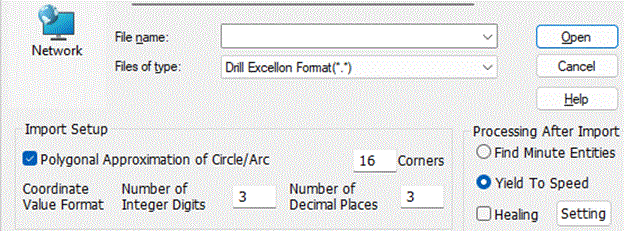
| Setting for Import of Drill Data File (Excellon format) | |
|
File Name |
Specifies the file name to import. Multiple files are selectable |
|
File Type |
Selects [Drill Excellon Format(*.*)] among file types to import. |
|
Arc Polygonal Approximation |
Converts circles to regular polygons, and arcs to polygonal arcs. |
|
Coordinate Value Format |
Sets both integer digits and decimal digits of the coordinate value format. Specify the coordinate value format that was set when drill data was saved from CAD, CAM, or Board Edit software. |