


|
Home / How to Set Analysis Condition / List of Analysis Condition Tabs / Acoustic Analysis Tab
Acoustic Analysis Tab
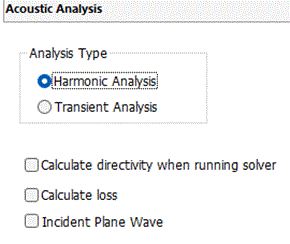
Analysis conditions for the acoustic analysis are set on this tab. The solver is Mach.
It is in the [Analysis Condition Setting] dialog box. See also [How to Set Analysis Condition].
|
Setting Item |
Notes |
|
Analysis Types |
Harmonic analysis Sinusoidal pressure or speed is applied.
|
|
Transient analysis Transient states are analyzed. The axisymmetric analysis is not supported.
|
|
|
Calculate directivity when running solver |
Available only for the harmonic analysis. If selected, the [Sound Waved Directivity] tab will become active. The result outputs of directivity are described in detail below
Directivity Graph: Result folder/Analysis model_HERTZ_RAD_PTN.plt Result Table: Radiation Gain (Max, Ave), Efficiency Depending on the selections of the sound waves directivity tab.
|
|
Calculate loss |
Available only for the harmonic analysis. The calculated loss is displayed in the result table.
|
|
Incident Plane Wave |
Available only for the harmonic analysis.
|
The Relating Tabs
The relating tabs are [Open Boundary] tab, [Harmonic Analysis] tab, [Transient Analysis] tab , and [High-Level Setting] tab.
How to Modify Analysis Conditions
To modify the analysis conditions, on the [Model] tab, go to

and click [Analysis Condition]  .
.