


|
Home / How to Set Analysis Condition / Fluid Analysis [Bernoulli] / Free Surface Analysis (VOF Method) Setting
Free Surface Analysis (VOF Method) Setting
|
Setting Item |
Notes |
|
Free Surface (VOF method ) Setting |
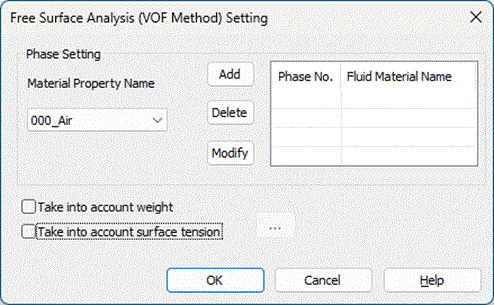
Select the material property name from the material list at the phase setting and click [Add]. The material will be registered to the phase list. Up to three phases can be analyzed. If the phase that is registered in the phase list is selected, click [Delete] to delete the registered phase. If the phase that is registered in the phase list is selected, click [Modify] to replace the registered phase with the phase selected at [Material Property Name].
|
|
Take into Account Weight |
Takes into account weight that is based on the density of the phase, if selected. |
|
Take into Account Surface Tension |
Takes into account surface tension between multiple phases, if selected.
|
 , if clicked, opens the [