


|
Home / How to Create Project / List of Conditions
List of Conditions
Settings of analysis condition, body attribute, material property and boundary condition are listed.
They can be checked and compared for multiple bodies or models at a glance.
-
Some settings are not included in the list.
Even if the difference between the models is not seen in the list, the condition settings may be different.
List of Condition Settings
-
On the [Analysis tab],

click ▼ of [List of Conditions] , select [List of Condition Settings] from the menu.
A dialog box of the list of condition settings will show up.
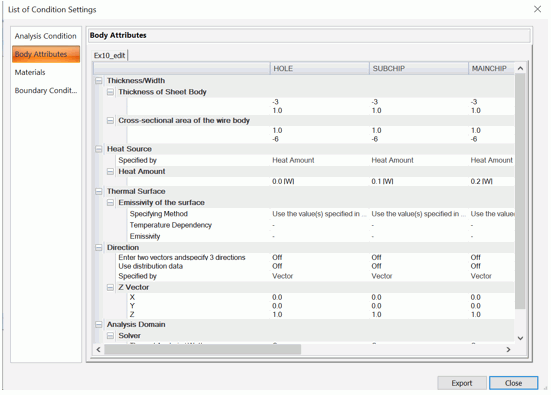
-
The list in the dialog box can be saved in the csv format by clicking
 .
.
Model-to-Model Comparison of Condition Setting
-
On the [Analysis tab],
click ▼ of the [List of Conditions], select [Model-to-Model Comparison of Condition Settings] from the menu.
A dialog box will show up to select a model to compare with the settings of the active model.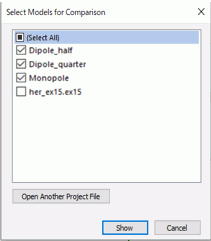
The project models opened by Femtet are displayed in the dialog box.
If a project you are looking for is not listed, click and select the project.
-
Click
 for the selected models to show the dialog box of the list of conditions.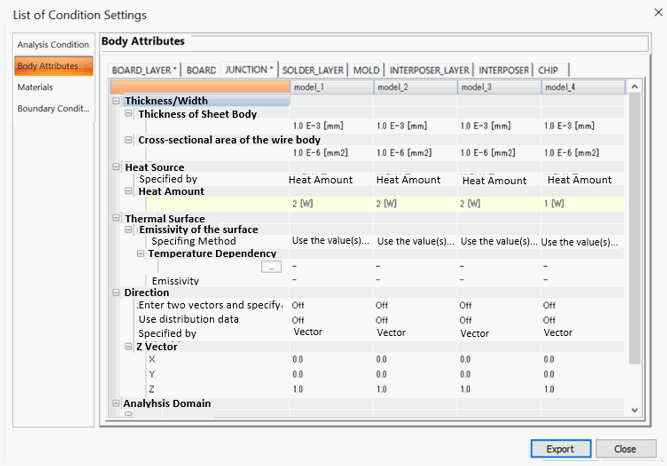
The row that contains difference between models are highlighted and the tab of the page containing the difference is marked with *.
-
The list in the dialog box can be saved in the csv format by clicking
.