


|
Home / Show Results / Result Field / Results in Specified Lattice
Results in Specified Lattice
Specifies the lattice area and outputs the results for grids.
On the [Results] tab, go to
Click ▼ at the side of [Results at Specified Coordinates]  and then click [Results in Specified Lattice]
  on the submenu.
The dialog box will show up.
Operations
|
|
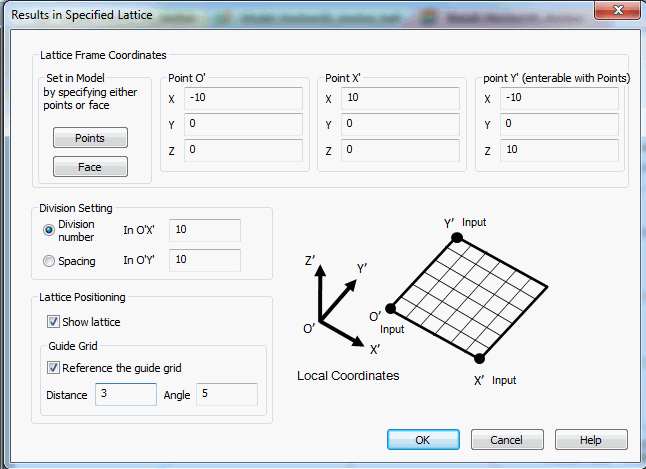
Lattice Frame CoordinatesEnter the local coordinates to specify the rectangle area. Alternatively, click on the model to set the coordinates. The coordinates selected by mouse will be entered in Point indicated by (enterable with Points) . If face is selected, the rectangle area containing the face will be set automatically.
Points The mouse is to pick up points on the model.
Face The mouse is to pick up face on the model.
Division SettingPoints can be specified by Number of Divisions or Spacing. Enter the numbers in OX' and in OY' Lattice PositioningShow lattice Shows the lattice if selected. Reference the guide grid translates or rotates the lattice based on the value set in Distance and Angle. |
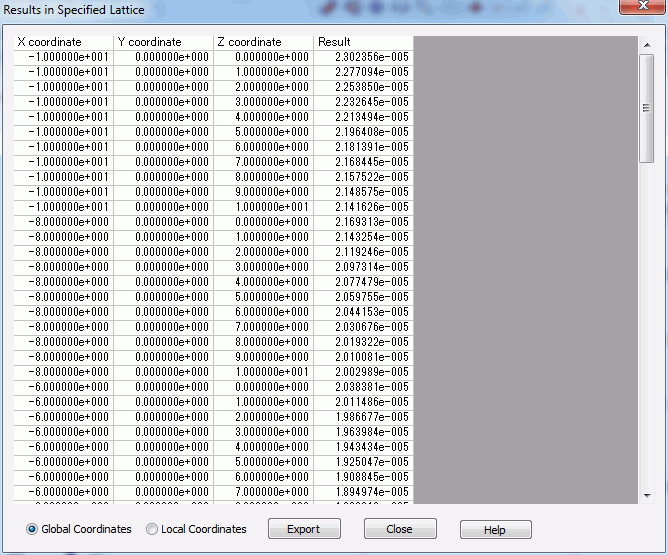
Output Table
 |
|
The values on the table are switchable between Global Coordinates and Local Coordinates. They can be saved in a csv file by Export. |
Lattice Positioning
 |
|
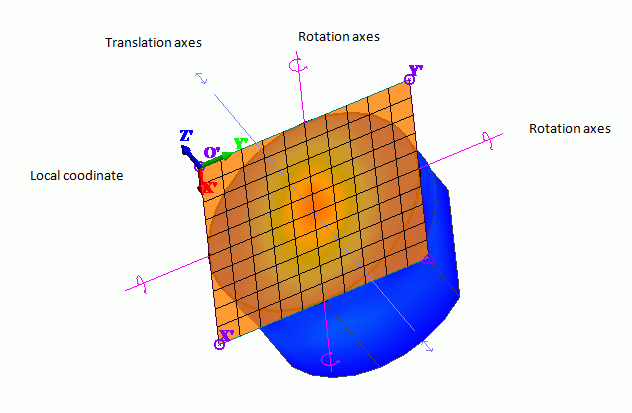
The rectangle area indicated by lattice is the range for table output. The number of lattice points are based on Division Setting.
The lattice can be oriented visually with the orienter.
The orienter consists of translational axis and rotational axis.
Move the mouse while selecting translational axis. The lattice will move in translation following the pointer. Move the mouse while selecting rotational axis. The lattice will move rotationally following the pointer.
The position will be fixed with the left click.
Double click or OK button will output the table.
|