


|
Home / Show Results / Descartes, the Graphing Tool / Miscellaneous / Formula in Dataset Title
Formula in Dataset Title
For Touchstone files, a user-defined formula can be entered in the dataset title.
Procedures
There are two methods.
-
Method 1: Click and edit the dataset title on the graph window.
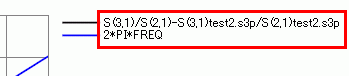
-
Method 2: Select a dataset and edit the dataset title in the property table.

Notes
-
Available for Touchstone files only.
-
The formula cannot be entered if the data are converted.
-
Select an appropriate format for the complex number for Y axis.
Lists
Here are the lists of operators, functions and constants.
-
The characters used for the function name and operator name can be in either upper case or lower case.
The calculation order of operators is the same as VB / VBA. In the table below, the operators in the upper rows have the higher priority than the ones in the lower rows.
|
Operator |
Note |
|
^ |
Power |
|
* / |
Multiplication Division |
|
+ - |
Addition Subtraction |
|
= <> < <= > > = |
Comparative operators
|
|
And |
Bitwise AND (The digits below the decimal point are truncated) |
|
Or |
Bitwise OR (The digits below the decimal point are truncated) |
|
Function |
Note |
|
S (Port1, Port2) |
The specified element of the matrix is calculated. Example: S (2,1) The matrix element of external Touchstone file can be accessed by specifying the file path. Example: S (2,1) Meas1.s2p
|
|
COMPLEX |
Complex numbers will not be converted to real numbers. They will remain as complex numbers even without this function. Example: COMPLEX (S (2,1)) |
|
DB |
The decibel expression of the complex number. Example: DB (S (2,1)) |
|
MAG |
The absolute value of the complex number. Example: MAG (S (2,1)) |
|
PHASE |
The argument of the complex number (unit: deg) Example: PHASE (S (2,1)) |
|
REAL |
The real part of the complex number Example: REAL (S (2,1)) |
|
IMAG |
The imaginary part of the complex number Example: IMAG (S (2,1)) |
|
Sin |
Sine. The unit of the argument is radian. |
|
Cos |
Cosine. The unit of the argument is radian. |
|
Tan |
Tangent. The unit of the argument is radian. |
|
Atn |
Arctangent. The unit of the return value is radian. |
|
Log |
Napierian logarithm (The base is e.) |
|
Sqr |
The square root |
|
Abs |
The absolute value |
|
F_IF |
F_IF is used to switch the formula conditionally.
Three arguments are required. The third argument returns if the first argument is "0.0". The separator is ",".
Example: F_IF (val_a <= 2, val_a * 2, val_b * 1.5) val_a * 2 will be returned if val_a is 2 or less. val_b * 1.5 will be returned if val_a is greater than 2. |
|
Constant |
Note |
|
FREQ |
Frequency. (Variable) |
|
j (i) |
Imaginary unit. (√-1)
Example: 0.5-j * 0.3 |
|
PI |
Circular constant. (3.1415926535898) |
|
C0 |
Speed of light. (2.99792e +08 m/s) |
Formulas
|
Operator |
Note |
|
Secant |
Sec (X) = 1 / Cos (X) |
|
Cosecant |
Cosec (X) = 1 / Sin (X) |
|
Cotangent |
Cotan (X) = 1 / Tan (X) |
|
Arc sine |
Arcsin (X) = Atn (X / Sqr (-X * X + 1)) |
|
Arc cosine |
Arccos (X) = Atn (-X / Sqr (-X * X + 1)) + 2 * Atn (1) |
|
Logarithm |
LogN (X) = Log (X) / Log (N) |
|
Power |
Pow (X, Y) = X ^ Y |