|
Home / How to Set Body Attribute, Material Property and Boundary Condition / How to Set Boundary Condition over the Bodies
How to Set Boundary Condition over the Bodies
-
The method below is applicable if Mesher G1 is selected. (In the case of default mesher [Mesher G2], the methods 1, 2, and 3 will yield the same results.)
Please see [Mesher Version] for the details of Mesher G1.
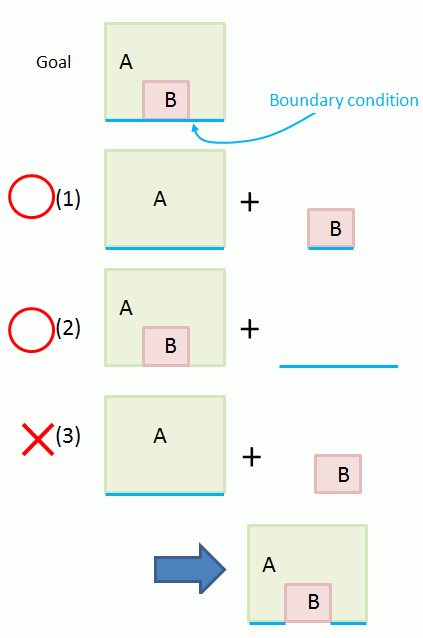
If bodies A and B are overlapping as in the following diagram, Femtet will remove the overlapping area by automatic boolean. The attributes set on the removed area will be lost.
Explained below is how to create a model consisting of bodies A and B whose attributes have an inclusion relation.
(1) The goal body is created by setting boundary condition on the bodies A and B respectively.
(2) The goal body is created by using an imprinting body of wire in addition to the bodies A and B.
(3) The goal body is not created if the boundary condition is set only on the body A. As in the diagram below, the boundary condition is not set on the body B.
It is removed together with the overlapping area by boolean operation.