


|
Home / Examples / Stress Analysis [Galileo] / Example 35: Elasto-Plastic Bilinear Material Subjected to Thermal Load
Example 35: Elasto-Plastic Bilinear Material Subjected to Thermal Load
General
-
In this example, the solder defined as a temperature-dependent elasto-plastic material is subjected to thermal load.
-
The plastic strain and the accumulated equivalent plastic strain at the reached temperature are solved.
-
Unless specified in the list below, the default conditions will be applied.
-
Obtain this session's project file. (Right-click and choose 'Save link as')
-
Results will vary depending on Femtet version and the PC environment.
-
Elasto-plastic analysis is available in an optional package.
Analysis Space
|
Item |
Settings |
|
Analysis Space |
2D |
|
Model Unit |
mm |
Analysis Conditions
To simplify the analysis, the 2-D model is analyzed.
Select the thermal load option.
|
Item |
Settings |
|
Solver |
Stress Analysis [Galileo] |
|
Analysis Type |
Static Analysis |
|
Options |
Select Thermal Load |
The Step/Thermal Load tab is set as follows.
|
Tab |
Setting Item |
Settings |
|||||
|
Step/Thermal Load |
Reference Temperature |
125 [deg] |
|||||
|
Step/Reached Temperature Setting |
|
||||||
|
Options for the Nonlinear Analysis |
Save the results of substeps : Select Add unloading step : Select |
The temperature changes from the reference temperature of 125 [deg] to the ambient temperature of -40 [deg] and then back to the reference temperature of 125 [deg] .The plastic deformation is analyzed
To shorten the calculation time, Number of Substeps is set to be smaller than the default value, 20.
By selecting [Add unloading step], the unloading process of -40 [deg] back to 125 [deg] is added to the loading process of 125 [deg] to -40 [deg].
By selecting [Save the results of substeps], the results at the intermediate temperatures can be output.
Model
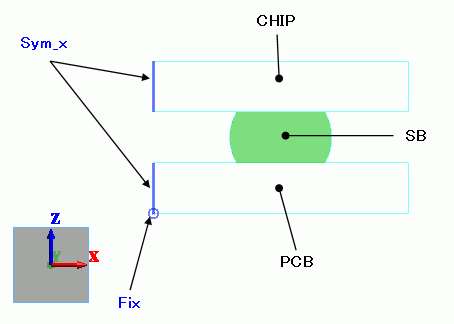
A silicon chip is to be soldered on a glass-epoxy PCB.
Select [Reflective] on the Symmetry/Continuity tab for the face of symmetry.
The mesh size of the solder ball is set to 0.1.
Body Attributes and Materials
|
Body Number/Type |
Body Attribute Name |
Material Name |
|
0/Sheet |
PCB |
006_Glass_epoxy |
|
1/Sheet |
CHIP |
301_Silicon(single-crystal) |
|
3/Sheet |
SB |
SOLDER |
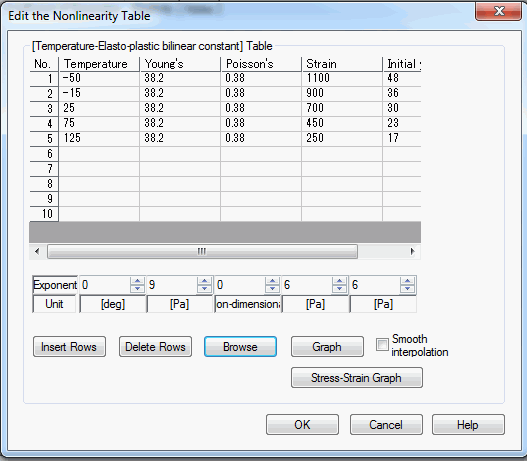
The material properties of SOLDER are set up as follows:
|
Material Name |
Tab |
Properties |
|
SOLDER |
Elasticity |
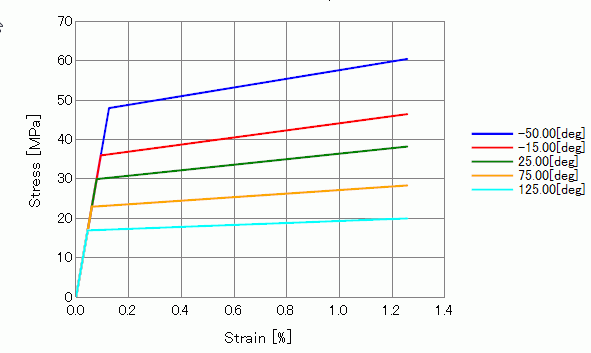
Material Type: Elasto-plastic/Bilinear Hardening Law: Kinematic Hardening * Material Property: as listed below
Stress - Strain Graph:
|
|
Coefficient of Linear Thermal Expansion |
21.7X10⁻⁶ [1/deg] |
* Isotropic hardening model is also included in the project file.
Boundary Conditions
|
Boundary Condition Name/Topology |
Tab |
Boundary Condition Type |
Settings |
|
Fix/Edge |
Mechanical |
Displacement |
Select the XZ components. UX=0, UZ=0 |
|
Sym_x/Edge |
Symmetry/Continuity |
Symmetry |
Reflective |
Results
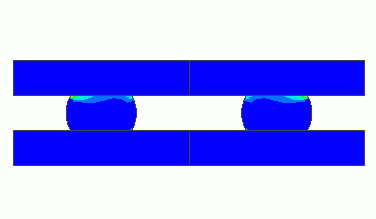
The principal strains of the plastic strain at step 1 (reached temperature of -40 [deg]) are shown below.
The full model can be viewed.
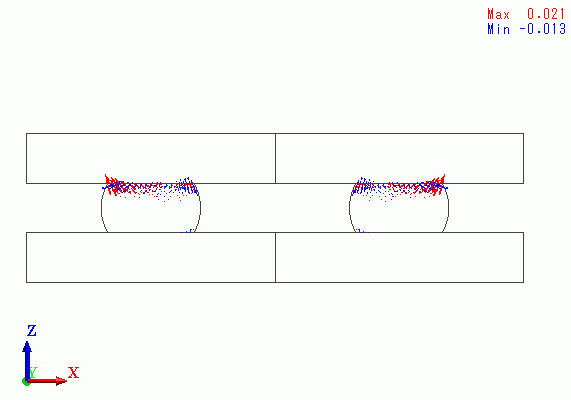
High strains are exhibited at the border of SB and CHIP.
The contour diagram below shows the accumulated equivalent plastic strains at step 1.
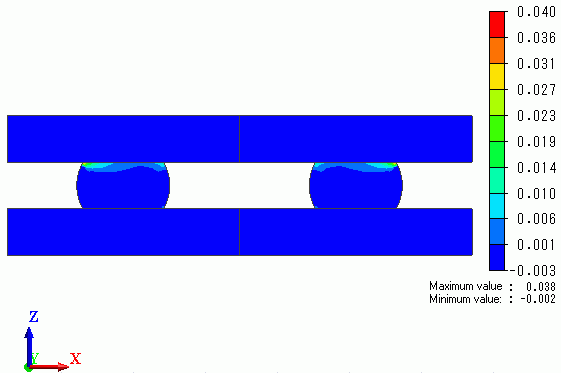
Strains are concentrated at the top right corner of the right solder ball.
The plots below indicate the accumulated equivalent plastic strain at the highly concentrated points over the steps.
One plot is based on the kinetic hardening while the other is based on the isotropic hardening.
For your reference: Isotropic Hardening and Kinetic Hardening
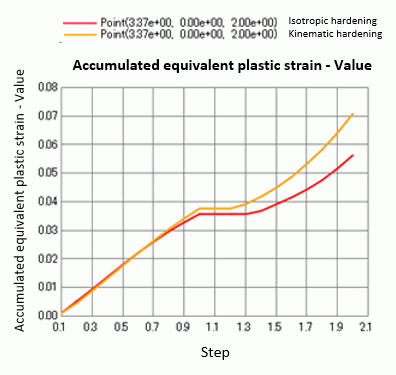
Steps 0 through 1 are the 10 steps starting from 125 [deg] down to -40 [deg].
Steps 1 through 2 are the 10 steps returning from -40 [deg] back to 125 [deg]. This is the unloading process.
The accumulated equivalent plastic strain increases even in the unloading process. The increase rate is higher with the kinetic hardening than with the isotropic hardening.