


|
Home / Tutorial / Integration with MATLAB/Simulink Motor Drive Analysis / 05. Supplement to FEM-Parameterized PMSM
05. Supplement to the Use of FEM-Parameterized PMSM
Additional information is provided here about how to use FEM-Parameterized PMSM.
General
FEM-Parameterized PMSM is Simulink’s PMSM model characterized by the physical quantities (interlinkage magnetic flux of coil, torque, etc) representing motor characteristics, and
corresponding rotor angles and d-q shaft currents.
-
The physical quantities to represent the motor characteristics depend on the options of FEM-Parameterized PMSM.
In this tutorial, the motor characteristics of PMSM analyzed by Femtet are
imported to FEM-Parameterized PMSM blocks.
-
To use FEM-Parameterized PMSM, MATLAB® and its related products are required.
See here the details of software used in this tutorial.
-
For more information about FEM-Parameterized PMSM, see the following.
https://www.mathworks.com/help/physmod/sps/ref/femparameterizedpmsm.html
Notes on FEM-Parameterized PMSM Setting (Block Choices)
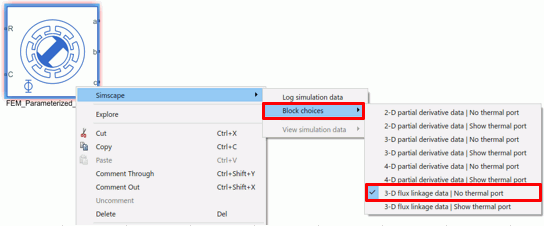
Options of Block Choices are available for FEM-Parameterized PMSM.
Please note, however, that the following options are only available for the Femtet-MATLAB/Simulink integration.
No other options are supported.
・ 3-D flux linkage data | No thermal port
・ 3-D flux linkage data | Show thermal port
-
Block Choices can be selected from the right-click menu on the FEM-Parameterized PMSM block of the Simulink analysis model.
Notes on FEM-Parameterized PMSM Setting (Block Parameters)
There are some restrictions on the block parameters.
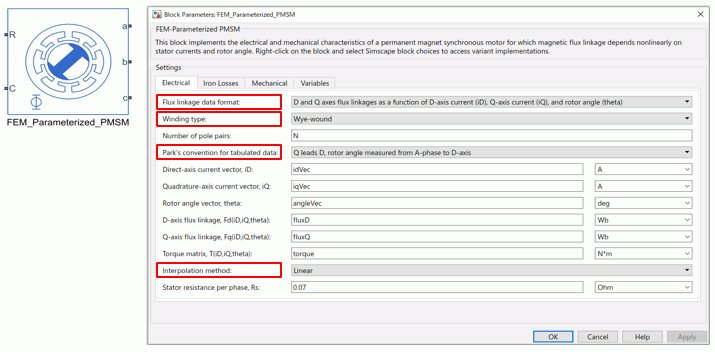
Block parameters are set on the Electrical tab as follows.
|
Item |
Available Options |
|
Flux linkage data format |
Following options only D and Q axes flux linkages as a function of D-axis current (iD), Q-axis current (iQ), and rotor angle (theta) |
|
Winding type |
Any options |
|
Number of pole pairs |
Enter as below N |
|
Park’s convention for tabulated data |
Following options only Q leads D, rotor angle measured from A-phase to D-axis |
|
Direct-axis current vector, iD |
Enter as below idVec |
|
Quadrature-axis current vector, iQ |
Enter as below iqVec |
|
Rotor angle vector, theta |
Enter as below angleVec |
|
D-axis flux linkage, Fd(iD,iQ,theta) |
Enter as below fluxD |
|
Q-axis flux linkage, Fq(iD,iQ,theta) |
Enter as below fluxQ |
|
Torque matrix, T(iD,iQ,theta) |
Enter as below torque |
|
Interpolation method |
Any options |
|
Stator resistance per phase, Rs |
Any values |
-
Do not modify the following texts typed in the text boxes on the Electrical tab.
N, idVec, iqVec, angleVec, fluxD, fluxQ, torque
If modified, the data of the motor characteristics file cannot be imported normally.
-
To see the Block Parameters options, double-click the FEM-Parameterized PMSM block on the Simulink analysis model.
The figure below shows the Electrical tab of Block Parameters. Options are indicated by red.
-
The values of the block parameters on the tabs except Electrical tab can be defined by users.
In this tutorial, the default values are used for all parameters.
For more information, refer to Help of FEM-Parameterized PMSM.
https://www.mathworks.com/help/physmod/sps/ref/femparameterizedpmsm.html
 Prev
Prev 