Femtet Help/Manual
 

Home / FAQ / Q2. What can I do if contour display is terminated abnormally or results display does not look good?

Q2. What should I do if contour display is terminated abnormally or results display does not look good?

A1. The display may be improved by changing the settings for drawing results.

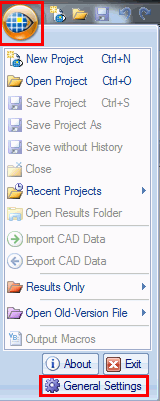
  1. Press [Femtet button] on the upper left corner and click [General Settings].


  1. On the [GUI Setting] tab, switch the selection of [OpenGL 1.0] and [OpenGL 3.2] for [Version of OpenGL]
    Click [OK] button.

  1. Restart Femtet.


A2. The display may also be improved by updating the video card driver. You can find out what video card is used in your PC as follows.

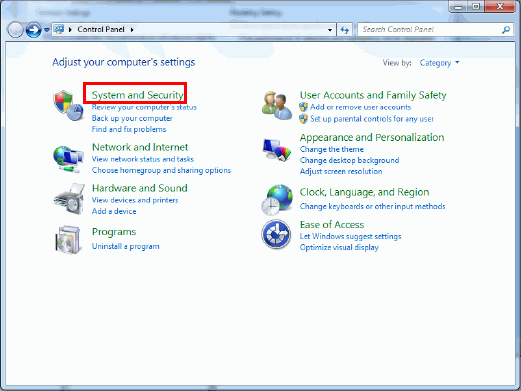
  1. In the Control Panel, click [System and Security].


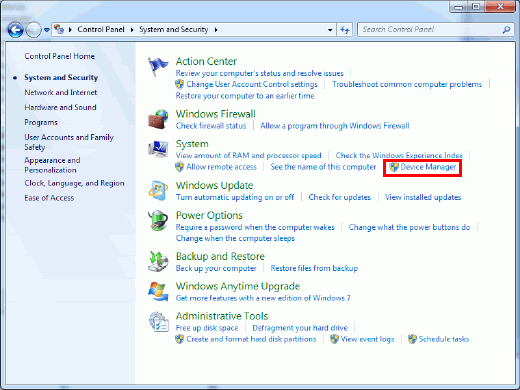
  1. Click [Device Manager].


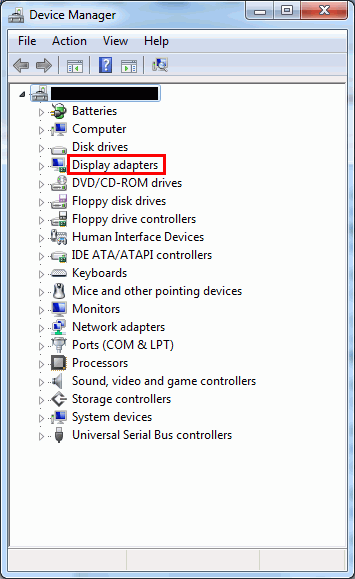
  1. The video card is shown in [Display adapters].
    Check the video card manufacturer's website for how to update the card.