


|
Home / Modeling / Auxiliary Tools / Check Boundary Connection
Check Boundary Connection
Check the connection of boundary conditions.
Search for the faces associated with the specified boundary conditions.
-
Select a face on which a boundary condition is set.
An error will occur if a boundary condition is not set on it.
-
On the [Model] tab, go to
 and click [Check Boundary Connection]
  .
.
-
Specify the boundary condition names. The names can be specified up to two.
-
Among the faces of the boundary conditions specified at 3,
the ones connected with the face selected at 1 will be highlighted.
-
Please note that the face contacting with a vertex will be considered as connected.
The "Check Boundary Connection" Dialog Box
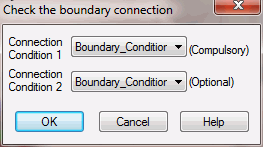
The faces of the boundary conditions specified in this dialog box are subject for the search.
It is possible to specify up to two boundary conditions. The faces associated with either boundary condition will be searched for.
Leave the second entry field blank if not needed.