


|
Contact Analysis Setting
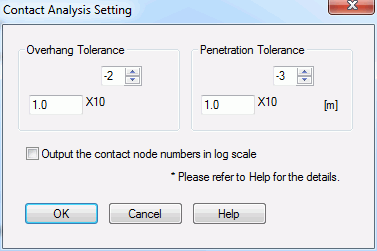
The analysis conditions for the contact analysis are set on this dialog.
|
Setting Item |
Notes |
|
Overhang Tolerance (see notes below) |
Sets the tolerance for the slippage of the nodes on the contactor surface parallel to the contactee surface. The value is the upper limit where the objects are considered to be in contact. The range is 0 to 1. |
|
Penetration Tolerance (see notes below) |
Sets the maximum value of tolerance, by which the faces are judged to be in contact when the nodes on the contacting faces penetrate the contactee surface. The penetration beyond the tolerance is not considered contacting.
In the case of default setting (the set value is negative)
The penetration tolerance is set automatically. In most cases, the default setting is not needed to be changed.
In the case of manual setting
Enter the positive value. The unit is [m].
|
|
Output the contact node numbers in log scale |
The node numbers, which are considered as being in contact during the iterated calculations, will be output in log scale. |
(Note) You don't need to change these two values in most cases.
See the Contact Analysis Setting for detail.