Home / Show Results / Graphics Setup / Displacement Diagram
Displacement Tab
|
Setting Items |
Notes |
|
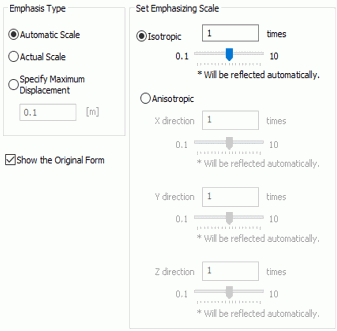
Emphasis Type |
Specifies the emphasis type when drawing a displacement diagram.
-
Actual Scale shows the displacement as it is calculated without emphasis.
-
Automatic Scale adjusts the scale automatically so that the maximum displacement is 1/20 of the model's largest dimension.
-
Specify Maximum Displacement specifies the the maximum displacement with the modeling dimensional unit.
|
|
Set Emphasizing Scale |
Sets the scale to apply to the displacement quantity selected in "Emphasis Type".
-
Isotropic shows the displacement magnified by the entered scale in X, Y, and Z directions.
-
Anisotropic shows the displacement magnified by the scales set for 3 directions individually.
|
|
Show the original form |
Shows the model before and after the displacement together. |


