


|
Home / Show Results / Graphics Setup / Mesh
Mesh Tab
|
Setting Items |
Notes |
|
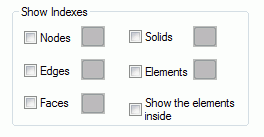
Show Indexes |
Select Nodes to show the index numbers of nodes starting at 0. Select Edges to show the index numbers of edges starting at 0. Select Faces to show the index numbers of faces starting at 0. Select Solids to show the index numbers of solids starting at 0. Select Elements to show the index numbers of elements starting at 0. Select Show the elements inside to show the indexes of elements inside. If deselected, the indexes only on the surface will be shown. After the selection is made, click the Color Setting button and specify the index color. |