


|
Home / Show Results / Graphics Setup / Streamline/Forceline
Streamline/Forceline
|
Setting Item |
Notes |
|
Line Color |
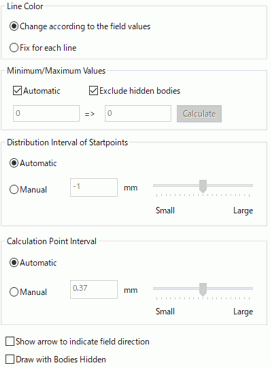
Change according to the field values sets the colors of the streamlines/forcelines according to the field values. Fix for each line assigns an single color to each streamline/forceline.
|
|
Minimum/Maximum Values |
Automatic calculates the minimum and maximum values for the color scale automatically. If Automatic is deselected, the minimum value and maximum value can be set manually. Calculate button sets the minimum and maximum values calculated automatically. Exclude hidden bodies calculates the minimum and maximum values with currently displayed bodies.
|
|
Distribution Interval of Start Points |
Automatic sets the distribution interval automatically according to the topology size of start point. Manual allows setting of the distribution interval in any way.
|
|
Calculation Point Interval |
If Automatic is selected, the interval is calculated automatically from the mesh size. If Manual is selected, the interval can be set as you like. |
|
Show Arrow to Indicate Field Direction |
Shows arrows on the streamlines/forcelines to indicate the field direction. |
|
Draw with Bodies Hidden |
Draws the streamlines while hiding the bodies. This function is intended mainly to verify the streamlines on the air body while a contour diagram is displayed. |