


|
Home / Show Results / Result Table
Result Table
After the simulation, various characteristic values such as the external/reactive force, the inductance, the capacitance etc can be summarized on a numerical summary table.
The values on the table can be copied, pasted or exported in CSV.
On the [Results] tab, go to

click [Table]  .
.
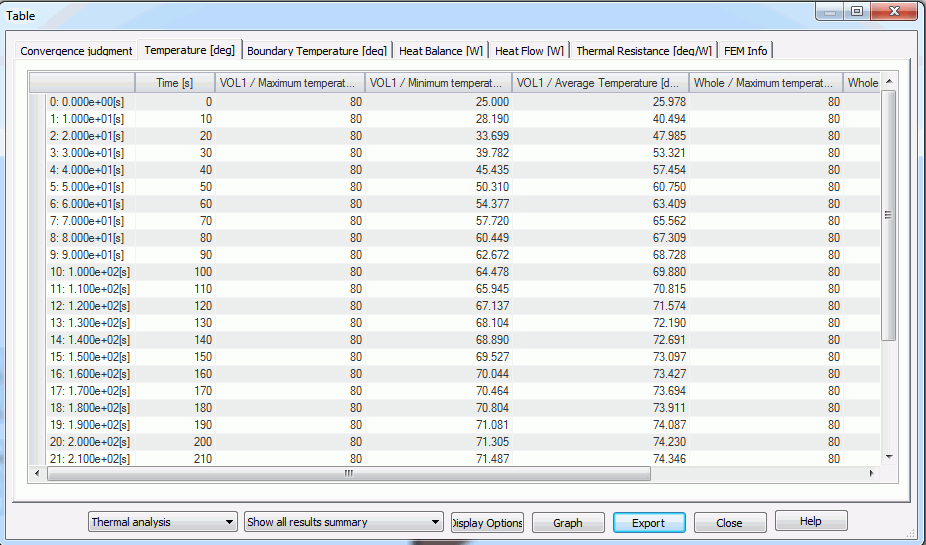
|
Item |
Notes |
|
Analysis Domain |
Specifies the analysis domain or mesh for table display. The results of, such as, coupled analysis and meshing are displayed. |
|
Mode |
Specifies a mode for table display. |
|
Display Options |
Sets the numerical representation style.
Format Selectable from Automatic, Decimal fraction and Exponent. Automatic follows the rules below. - If the number is over 999 or below 0.001, it will be represented by exponent. - The number of decimal places is fixed to 3. The third decimal place will not be shown if it is 0.
Number of Decimal Places Can be any value from 0 to 20. - If the format is Automatic, this field will be masked.
X Axis Setting for Transient Analysis Result Selectable from Automatic, Time, Step, Angle (Mechanical angle), and Angle (Electric angle) Angle is only available for the magnetic-transient analysis.
|
|
Graph |
Activated when "Show all results summary" is selected at Mode. |
|
Adjustment Factor |
Appears only when the boundary condition is set to Reflective symmetry. The results multiplied by the adjustment factor will be displayed. |
|
Export |
Exports the contents of all the tables in the csv format. To export the table individually, right click the table and select "Export". |
