


|
Home / Show Results / Extract Results
Extract Results
This function allows you to extract the maximum and minimum values of the fields (stress, electric field, temperature), the values at the specified coordinates, and the calculated values (external force/reactive force, capacitance, inductance) from the specified results.
Any combination of the settings can be made as an extracting condition.
For parametric analysis, the extraction setting can be done after the analysis is finished by using this function.
On the [Results] tab,

click [Extract Results] . The setting window will show up.
Press [Apply] button to extract the results with the specified condition.
Overview
The field values and the calculated values are set and the targets to extract are set.
Each setting is selectable at the check box.
The results of the selected settings are output by pressing an Apply button.
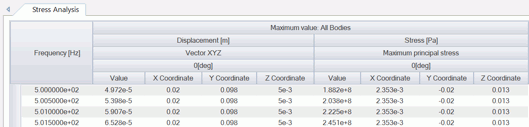
The results are output in a table.
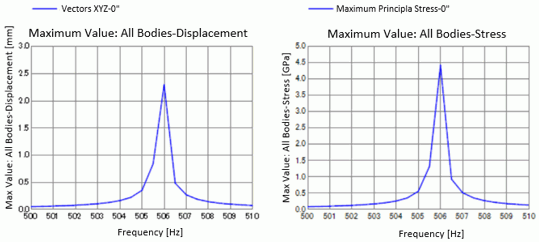
Some results can be displayed in a graph.
Field Values
The field values and the calculated values are mutually exclusive.
The field values and the calculated values can be switched by tab.
Field Setting

|
Setting Item |
Notes |
|
|
Check Box |
Controls enable/disable. Selected setting is applied. The check box in the header controls all setting items at a time.
|
|
|
Solver |
Selectable from the list. The solvers of the current results are listed.
|
|
|
Mode |
Selection Method |
All Modes Calculates all modes.
Range Sets the range of selection.
Single Calculates one mode.
List Selectable from the list.
|
|
Start / List |
Start Selects one mode from the list if the selection method is Range.
List Selects the modes from the list if the selection method is List. Multiple modes can be selected.
|
|
|
Finish |
Selects one mode from the list if the selection method is Range. |
|
|
Interval |
Sets the selection interval of the modes if the selection method is Range. For example, if the interval is 1, all modes in the range are selected, and if it is 2, every other mode in the rage are selected.
|
|
|
Field |
Selects the fields of the specified solver.
|
|
|
Component |
Selects the components of the specified field from the list.
|
|
|
Phase |
Selects the phases of the specified field and components from the list.
|
|
|
Notes |
Available for writing the explanation for the setting. |
|
|
Add |
Adds a row for the setting. |
|
|
Delete |
Deletes the setting of the selected row. |
|
Output Setting
Select from "Maximum/Minimum Values" and "Specify Coordinates".
Maximum/Minimum Values
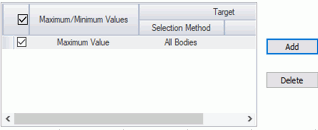
|
Setting Item |
Notes |
|
|
Check Box |
Controls enable/disable. Selected setting is applied. The check box in the header controls all setting items at a time.
|
|
|
Maximum/Minimum Values |
Selects the output target from "Maximum/Minimum Values". |
|
|
Target |
Selection Method |
All Bodies Calculates all bodies.
Body Attribute Name (combined) Selects the body attribute names for calculation from the list. If multiple body attribute names are selected, the bodies with those attribute names are subject to calculation and the maximum and minimum values are output one each.
Body Attribute Name (individual) Selects the body attribute names for calculation from the list. If multiple body attribute names are selected, the maximum and minimum values for each body are output.
Material Name (combined) Selects the material names for calculation from the list. If multiple material names are selected, the bodies having those material names are subject to calculation and the maximum and minimum values are output one each.
Material Name (individual) Selects the material names for calculation from the list. If multiple material names are selected, the maximum and minimum values for each body are output.
|
|
List |
Selects the body attribute names/material names from the list. |
|
|
Add |
Adds a row for the setting. |
|
|
Delete |
Deletes the setting of the selected row. |
|
Specify Coordinates
Select input type from the list of coordinates and the grids (1/2/3D).
List of Coordinates
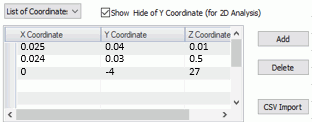
|
Setting Item |
Notes |
|
X, Y, and Z coordinate |
Sets the value of coordinates.
|
|
Add |
Adds a row for coordinate entry. |
|
Delete |
Deletes the coordinates of the selected row. |
|
CSV Import |
Specifies the CSV file to import the coordinates. The rows are increased automatically according to the number of imported coordinates.
|
|
Show & Hide of Y Coordinate (for 2D Analysis) |
Controls show/hide of the Y coordinate. It is intended to use in the 2D analysis where X and Z coordinates are entered. |
Grids (1D/2D/3D)

|
Setting Item |
Notes |
|
Point O' |
Sets the origin of the local coordinates in the global coordinate system.
|
|
Point X' |
Sets the endpoint in X-direction of the local coordinates in the global coordinate system. |
|
Point Y' |
Sets the endpoint in Y-direction of the local coordinates in the global coordinate system. |
|
Point Z' |
Sets the endpoint in Z-direction of the local coordinates in the global coordinate system. |
|
O'X' |
Sets the number of divisions or pitch between the points O' and X'. Click a cell above to toggle the number of divisions and the pitch.
|
|
O'Y' |
Sets the number of divisions or pitch between the points O' and Y'. Click a cell above to toggle the number of divisions and the pitch.
|
|
O'Z' |
Sets the number of divisions or pitch between the points O' and Z'. Click a cell above to toggle the number of divisions and the pitch.
|
|
Show & Hide of Y Coordinate (for 2D Analysis) |
Controls show/hide of the Y coordinate. It is intended for use in the 2D analysis where X and Z coordinates are entered. |
Calculated Values
The calculated values and the field values are mutually exclusive.
The field values and the calculated values can be switched by tab.

|
Setting Item |
Notes |
|
|
Check Box |
Controls enable/disable. Selected setting is applied. The check box in the header controls all setting items at a time.
|
|
|
Solver |
Selectable from the list. The solvers of the current results are listed.
|
|
|
Mode |
Selection Method |
All Modes Calculates all modes.
Range Sets the range of selection.
Single Copy Calculates one mode.
List Selectable from the list.
|
|
Start / List |
Start Selects one mode from the list if the selection method is Range.
List Selects the modes from the list if the selection method is List. Multiple modes can be selected.
|
|
|
Finish |
Selects one mode from the list if the selection method is Range. |
|
|
Interval |
Sets the selection interval of the modes if the selection method is Range. For example, if the interval is 1, all modes in the range are selected, and if it is 2, every other mode in the rage are selected.
|
|
|
Output Value |
Selects the output values of the specified solver from the list. The explanation of the selected output values is displayed in the window below. |
|
|
Parameter |
Shows the setting items for the output values. For reference, see the explanation of the output values that appears in the window below. |
|
|
Add |
Adds a row for the setting. |
|
|
Delete |
Deletes the setting of the selected row. |
|
Extraction Target
The settings are common to the field values and the calculated values.
The results for extraction can be specified in various ways.

|
Setting Item |
Notes |
|
Check Box |
Controls enable/disable. Selected setting is applied. The check box in the header controls all setting items at a time.
|
|
Selection Target |
Selects the results for extraction from the list.
Current Results Selects the currently active results as an extraction target.
Results of the Current Project Selects analysis model from the list for extraction. For the parametric analysis model, the results of all conditions are the extraction target.
Specify Project File Specifies the project file for extraction.
Specify Result File Specifies the result file for extraction.
Specify Folder Specifies the folder that contains the results for extraction.
|
|
File Folder Model of the Current Project |
File Shows the file path if the selection target is "Current Results", "Specified Project File", or "Specified Result File".
Folder Shows the folder path if the selection target is "Specify Folder".
Model of the Current Project Shows the list of analysis models if the selection target is "Results of the Current Project". |
|
List of Analysis Model Names Text in the file name |
List of Analysis Model Names Shows the list of analysis models if the selection target is "Specify Project File". For the parametric analysis model, the results of all conditions are the extraction target.
Text in the file name If no text is specified, all result files (.pdt) in the folder are the extraction target.
|
|
Add |
Adds a row for the setting. |
|
Delete |
Deletes the setting of the selected row. |
Buttons at the Bottom
|
Item |
Notes |
|
Import of Setting |
Adds the setting from the folder to the current setting. |
|
Export of Setting |
Saves the current setting. |
|
Initialize |
Returns to the initial settings. |
|
Apply |
Executes result extraction with the current setting. Selected settings are applied.
|
|
Close |
Closes the dialog box. |
Output Table
The outputs are displayed in a table on another window.
The function of each button is as below.

|
Item |
Notes |
|
|
Numerical Representation |
Format |
Specifies the format for the numerical value.
Automatic Switches decimal fraction and exponent automatically according to the numerical value.
Decimal fraction Represents the value as decimal fraction.
Exponent Represents the value as exponent.
|
|
Number of Decimal Places |
Specified for the representation in decimal fraction and exponent. |
|
|
Show All Outputs of Multiple Result Files |
Shows all outputs of result files in one table. This function is intended for comparing the results of parametric analysis.
|
|
|
Graph |
Shows the results in the graph. The maximum and minimum values of the field values and the results of calculated value are applicable.
|
|
|
Show Columns of Absolute Values |
Controls hide/show of the columns of absolute values for the complex numbers. |
|
|
Show Columns of Phases |
Controls hide/show of the columns of phases for the values of complex numbers. |
|
|
Show Columns of Coordinates |
Controls hide/show of the columns of coordinates for the maximum and minimum values. |
|
|
Export |
Saves the contents of the output table in the csv file. Right-click menu on the table or Ctrl+C keys allows you to copy the contents of the output table to a clipboard.
|
|
|
Close |
Closes the output table. |
|