|
Home / Show Results / Characteristics by Charts / Directivity / Calculation of Sound Waves Directivity
Sound Waves Directivity
The region outside the analysis model with an open boundary has no mesh. In the acoustic harmonic analysis, the sound pressure levels in the region are calculated and displayed
On the [Results] tab

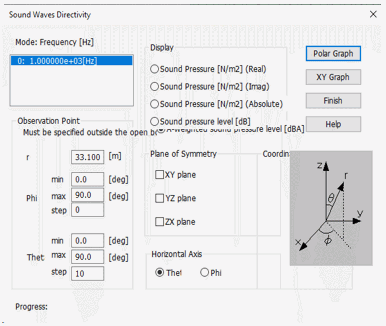
click ▼ at the side of [Show Characteristics Chart]  and select [Directivity Graph] on the submenu. The [Sound Waves Directivity] dialog box will appear.
|
Item |
Notes |
||||
|
Graph Type |
Either XY Graph or Polar Graph can be selected. |
||||
|
Observation Point |
Specified by the distance and the angles. See the figure at Coordinate system for the parameters definition.
|
||||
|
Display |
Selectable from real part, imaginary part, sound pressure level, and A-weighted sound pressure level. |
||||
|
Plane of Symmetry |
Specified to create a half, quarter, or 1/8 model. For example, select XY plane for the model created in the +Z axis area. |
||||
|
[Setting] - [Horizontal axis] |
Selectable from θ or φ for the horizontal axis of XY graph and the angle component of the polar graph. |
||||
|
Create display data |
Selectable from Polar Graph and XY Graph. It might take a while to create the data. To abort it, press the <ESC> key. |
||||
|
Caution |
The settings for the items other than the modes and the observation points will be saved for the next operation. The modes and the observation points will not be saved as they depend on the model and the analysis. |
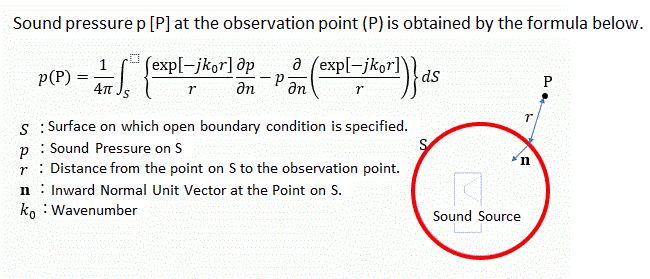
Sound wave directivity is calculated using the Kirchhoff integral theorem. The theoretical equation is as follows.