


|
Home / Technical Notes / Modeler / DXF File Import/Export Specifications
DXF File Import/Export Specifications
1. Entities in DXF file
Graphical objects are defined by ENTITIES in DXF file.
Femtet supports the entities listed below.
Other entities not listed here, such as TEXT, 3DSOLID, BODY etc, are not supported.
-
Before importing or exporting, please check which entities are used in your CAD system.
|
Entities |
Graphical Objects | Notes |
|
POINT |
 |
Defines a point. |
|
LINE |
|
Defines a line. |
|
ARC |
 |
Defines an arc. |
| CIRCLE |  |
Defines a circle. |
| ELLIPSE |  |
Defines an ellipse or an elliptical arc. |
| POLYLINE |  |
Defines an aggregation of line/arc segments. |
| SPLINE |  |
Defines a spline. |
| SOLID |  |
Defines a face formed by lines. |
| HATCH |  |
Defines a face formed by LINE/ARC/ELLIPSE/POLYLINE/SPLINE border. |
| BLOCK |  |
Defines a object formed by multiple entities. |

2. DXF file import
DXF entities are imported to Femtet as described below..
Femtet tries to import the objects as sheet body if it can.
If not possible, they will be imported as wire body.
The failure to convert to sheet body is usually caused by minute wire bodies occasionally included in the imported CAD data.
This problem might be solved by identifying and removing such bodies.
See [Conversion Failure from Wire Bodies to a Sheet Body] regarding the recovery method.
If you cannot correct the problem in Femtet, you need to solve it in the original CAD system.
|
Entity |
Geometry in Femtet |
Notes |
|
POINT |
|
Imported as vertex body. |
|
LINE |
|
Imported as line wire body. |
|
ARC |
|
Imported as arc wire body.
|
| CIRCLE |  |
Imported as circular sheet body.
|
| ELLIPSE |  |
Imported as elliptical sheet body.
|
| POLYLINE |  |
Imported as wire body consisting of line/arc edge topologies. |
| Belt-shaped POLYLINE |
 |
Imported as sheet body having the specified width..
|
| Closed POLYLINE |
 |
Imported as sheet body consisting of line/arc edge topologies. |
| SPLINE |  |
Imported as spline wire body.
|
| Closed SPLINE |
 |
Imported as sheet body consisting of spline edge topologies.
|
| SOLID |  |
Imported as sheet body consisting of line edge topologies. |
| HATCH |  |
Imported as sheet body consisting of line/arc/spline edge topologies.
|
| BLOCK |  |
Each entity group in the block is imported individually. |


3. DXF file export
Bodies in Femtet are exported to DXF as described below.
Femtet cannot export solid bodies.
|
Bodies in Femtet |
Graphical Objects |
Notes |
|
Vertex body |
|
Exported as POINT. |
|
Wire body consisting of a line edge topology |
|
Exported as LINE. |
|
Wire body consisting of an arc edge topology |
|
Exported as ARC. |
| Wire body consisting of a circular edge topology |  |
Exported as CIRCLE. |
| Wire body consisting of an elliptical edge topology |  |
Exported as EPPLIPSE. |
| Wire body consisting of an elliptical arc edge topology |  |
Exported as EPPLIPSE. |
| Wire body consisting of a spline edge topology |  |
Exported as SPLINE. |
| Wire body consisting of multiple line/arc edge topologies |  |
Exported as LWPOLYLINE. |
| Wire body consisting of elliptical arc/spline edge topologies |  |
Each topology is individually exported as LINE, ARC, ELLIPSE, or SPINE . |
| Sheet body consisting of a circular edge topology |  |
Exported as HATCH. |
| Sheet body consisting of an elliptical edge topology |  |
Exported as HATCH. |
| Sheet body consisting of multiple line/arc edge topologies |  |
Exported as HATCH. |
| Sheet body consisting of elliptical arc/spline edge topologies |  |
Each topology is individually exported as LINE, ARC, ELLIPSE, or SPINE . |


4. Import Setup "Round off to [x] decimal digits"
The coordinates are rounded off to the specified decimal digits.
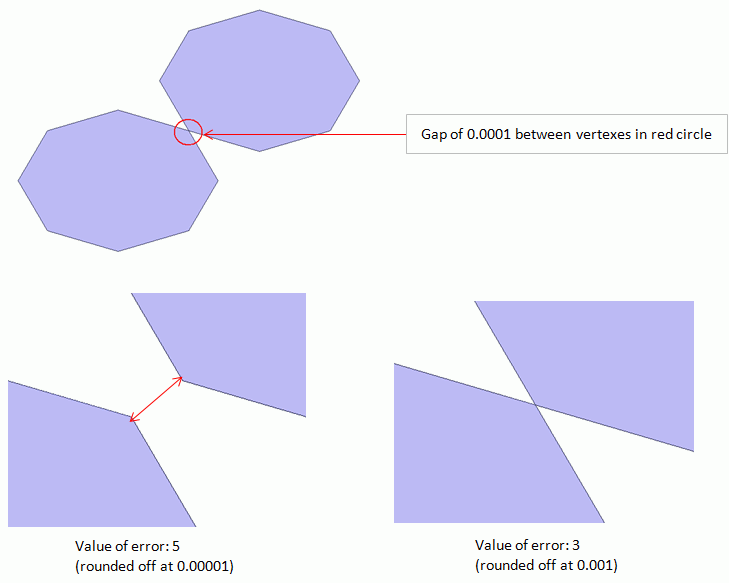
With this function, the vertices in a close proximity can be collected to one.
You might find some vertices highlighted when [Check Bodies] is performed on objects imported from DXF. Such a problem might be solved by adjusting the decimal digits.

If 16 is specified, the coordinates are not rounded off. If 5 is specified, the coordinates are rounded off.
5. Import Setup "Polygonal approximation of circle/arc "
The drawing speed will accelerate if the polygonal approximation is applied on circles or arcs..
Please note that it might result in errors during meshing in some cases.
-
Do not use [Circle/arc fitting correction].
[Circle/arc fitting correction] is a function to align vertex coordinates with arc in DXF file data. The coordinates will not be corrected on the edge of the converted polygon.

Left Fig: No approximation Right Fig: Approximation (Octagon)
6. Import Setup "Remove edges shorter than [x]"
Edges shorter than the specified length are removed.
The minute edges and unneeded vertices that can cause an error in meshing are removed effectively.
You might find some vertices highlighted when [Check Bodies] is performed on objects imported from DXF. Such problems might be solved by adjusting the decimal digits.
There might be a case, however, where the edges shorter than the specified length are not removed depending on the model.

Left Fig: No removal (The length is set to nil) Right Fig: Removal (The length is set to a certain value)
7. Import Setup "Linear interpolation"
Multiple edge topologies composed of continuous lines/curves are converted to a single-line edge topology. It is useful to remove unneeded vertices and edges.

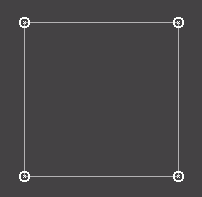
Left Fig: Without linear interpolation Right Fig: With linear interpolation
Note that it might misinterpret the shapes having a high aspect ratio.
See an example below.
Disable it in such a case.
Without linear interpolation

With linear interpolation
