|
Home / How to Set Body Attribute, Material Property and Boundary Condition / Body Attribute Tabs / Initial Strain Tab
Initial Strain Tab
The initial strain for the body is set on this tab.
It is available for the static stress analysis and static piezoelectric analysis.
It is shown in the [Edit Body Attribute] dialog box. See [How to Set Body Attribute/Material Property].
The isotropic or anisotropic initial strain can be set up here.
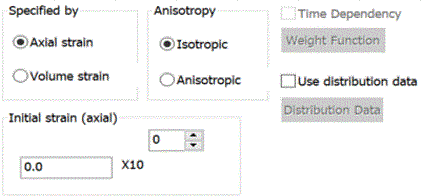
The isotropic initial strain should be set at Axial Strain or Volume Strain.
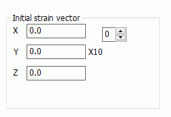
The anisotropic initial strain should be set by the axial vector.
In the thermal load analysis, the initial strain caused by the temperature difference should be considered in addition to the initial strains described above.
Given that the initial strain is ε0, coefficient of linear thermal expansion is α, the internal temperature is θ and the reference temperature is θ0,
the total initial strain is ε0 + α (θ - θ0).
See Coefficient of Linear Thermal Expansion tab.
|
Setting Items |
Notes |
|
|
Specified by |
Selects either Axial strain or Volume strain. |
|
|
Anisotropy |
Enterable for the axial strain. Select either Isotropic or Anisotropic. |
|
|
Initial Strain (axial strain) |
Enterable for the isotropic axial strain. |
|
|
Initial Strain (volume) |
Enterable for the isotropic volume strain. |
|
|
Initial Strain Vector |
Enterable for the anisotropic axial strain. The vector direction of the initial strain (x, y, z) will be changed according to the setting on the [Direction] tab of the body attribute.
|
|
|
Time Dependency (Weight Function) |
Available only if the static analysis and the step analysis are used in the stress analysis.
Select it, press the Weight Function button, and fill in the Time-Weight table. The change of the initial strain over the time can be set. If not selected, the initial strain remains constant. |
|
|
Use Distribution Data |
If Use distribution data is selected, Click the Distribution Data button to open the dialog box. |
|