


|
Home / How to Set Body Attribute, Material Property and Boundary Condition / Body Attribute Tabs / Thermal Surface Tab
Thermal Surface Tab
The thermal load for the body is set on this tab.
It is shown in the [Edit Body Attribute] dialog box. See [How to Set Body Attribute/Material Property].
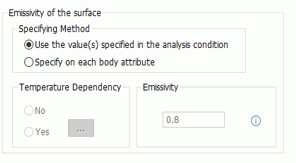
The emissivity be set at [Radiation Setting] for analysis condition.
|
Setting Item |
Notes |
|
Specifying Method |
Applies either default values set in [Radiation Setting] for analysis condition or individual setting for each body attribute. In the former case, the emissivity setting below is ignored. |
|
Temperature Dependency |
Sets [No] if the emissivity is not temperature dependent. Sets [Yes] if the emissivity changes over the temperature.
Fill in the table. |
|
Emissivity |
Enter the emissivity if [No] is set for the temperature dependency. |
 launches the