


|
Radiation Setting
The following items relating to the radiation are set up.
・Outer boundary condition setting
・Default value of emissivity
・Emissivity of each body attribute
・Emissivity of each boundary condition
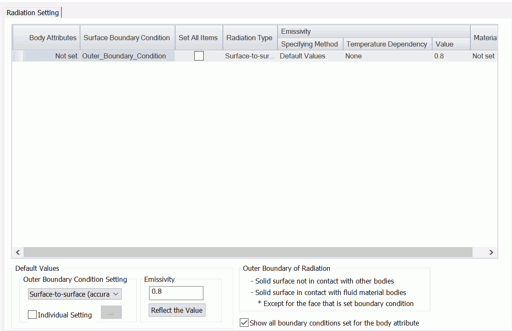
|
Setting Item |
Notes |
|
Emissivity Table |
Body Attribute (not editable)Displays the body attribute names. Surface Boundary Condition (not editable)Displays the outer boundary conditions. When the boundary condition is set to the body surface, if [Show all boundary conditions set for the body attribute] is selected, the set boundary conditions will be displayed in addition to the outer boundary conditions. Set All ItemsSets all the selected body attributes and boundary conditions. Radiation Type (editable)Displays the radiation type set for the boundary condition. ("No setting", "ambient (speed prioritized)", "surface-to-surface (accuracy prioritized)", and "follow the outer boundary condition")
Editable item: Radiation type on the [Thermal tab] Emissivity: Specifying Method (editable)Selectable from [Default value], [Body attribute value], and [Boundary condition value].
If the individual setting is selected on the [Thermal tab], [Boundary condition value] is displayed. If the individual setting is not selected on the thermal tab, and [Use the values specified in the analysis condition] is selected on the [Thermal Surface tab], the values specified in the analysis condition will be displayed.
Editable items: Individual setting on the Thermal tab], and [Use the values specified in the analysis condition] and [Specify on each body attribute] on the [Theramal Surface tab] Emissivity: Temperature Dependency (editable)Shows selection status of temperature dependency.
If the specifying method is the boundary condition value, the selection by the [Individual Setting of Radiation] is displayed. If the specifying method is the body attribute value, the selection on the [Thermal Surface tab] is displayed.
Editable items: Temperature dependency by the [Individual Setting of Radiation] and temperature dependency on the [Thermal Surface tab]. Emissivity: Value (editable)Shows setting status of emissivity.
If the specifying method is the boundary condition value, the emissivity by the [Individual Setting of Radiation] is displayed. If the specifying method is the body attribute value, the emissivity on the [Thermal Surface tab] is displayed. If the specifying method is the analysis condition value, the default value set in the dialog box is displayed.
If the temperature dependency is set, a button for editing table will be displayed.
Editable items: Default emissivity, the emissivity by the [Individual Setting of Radiation], and the emissivity on the [Thermal Surface tab]. Material (not editable)Shows the material name of the body to which the body attribute is set. If there are more than one material name, all of them are displayed.
|
|
Default Value |
Outer Boundary ConditionShows and sets the radiation type for the outer boundary condition and individual setting. For the details of radiation setting, see Thermal tab. EmissivityShows and sets the default emissivity. Press [Reflect the Value] button to reflect the value in the emissivity table.
|
|
Outer Boundary of Radiation |
Describes how the outer boundary of radiation is treated.
The radiation is treated differently from the conventional outer boundary conditions. For the conventional outer boundary, in addition to the solid surface that is not in contact with other bodies,
If the boundary condition is set to the outer boundary or the solid surface contacting the fluid material, If you want to reflect the same settings as the outer boundary condition, select [Follow the outer boundary condition] as radiation type.
|