


|
Home / How to Set Body Attribute, Material Property and Boundary Condition / Electric Analysis [Coulomb] / Boundary Condition / Plating wall
Plating Wall
Set the plating boundary. Select "Perform the plating analysis" on the analysis condition setting.
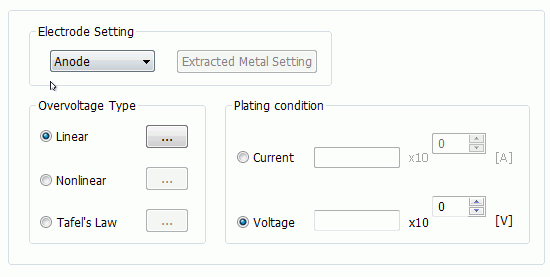
Then select Plating wall on Electric tab of the [Edit Boundary Condition] dialog box.
|
Setting Item |
Notes |
||||||||||||
|
Electrode Setting |
As a type of plating electrode, select either anode or cathode. If "Calculate the plating thickness" on Electric Analysis tab of Analysis condition is selected,
|
||||||||||||
|
Extracted Metal Setting |
If "Calculate the plating thickness" on Electric Analysis tab of Analysis condition is selected,
|
||||||||||||
|
Overvoltage Type |
Sets the approximation method of the overvoltage curve. By selecting either Linear or Tafel's Law for the type of overvoltage,
|
||||||||||||
|
Plating Condition |
Sets the plating condition if Anode is selected in the Electrode Setting.
If Current is selected in the plating conditon, analysis is performed when the set current flows into the analysis domain from the face of plating wall.
If Electric Potential is selected in the plating condition, the voltage on the face of plating wall can be specified.
|