


|
Home / How to Set Body Attribute, Material Property and Boundary Condition / Material Property Tabs / Density Tab
Density Tab
The material's density is set on this tab.
It is in the [Edit Material Property] dialog box. See [How to Set Body Attribute/Material Property].
This setting is required for stress analysis (acceleration option and resonant analysis), thermal analysis (transient analysis), and fluid analysis.
For acoustic analysis, please refer to "Density Tab of Acoustic Analysis" below.
|
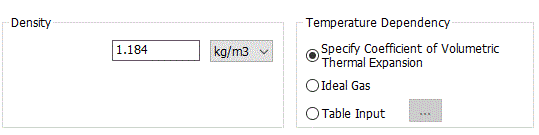
Setting Items |
Notes |
|
Density |
The significand is a real number greater than 0. |
|
Temperature Dependency |
Must be set if [Take Buoyancy into Account (Natural Convection)] is selected on the [Fluid-Thermal Analysis tab].
Set either one of the following for temperature dependency. If gas is analyzed under large temperature differences in an open space, the ideal gas is recommended.
[Specify Coefficient of Volumetric Thermal Expansion]
The density is proportional to the temperature difference from the ambient temperature and the coefficient of volumetric thermal expansion. Buoyancy is calculated using the Boussinesq approximation. Unless the gas is analyzed under a large temperature difference in an open space, this option is recommended for better convergence.
[Ideal Gas]
The density is calculated by the equation of state assuming the pressure is constant. If ambient pressure is specified in the ambient value setting of the analysis condition, the specified pressure is applied; if it is not specified, normal pressure is applied. The calculated temperature at each point will be used. The reference density (refer to the section "4 External Force" in Differential Equations in Fluid Analysis/Fluid-Thermal Analysis) is automatically calculated from ambient temperature and ambient pressure. For ideal gas, the continuity equation is applied in a form that satisfies mass conversion. However, in a closed space, changes in pressure cannot be taken into account for density, so that ideal gas is not recommended.
[Table Input]
In the temperature-density table, density having a temperature dependency can be entered directly. Reference density uses the value at ambient temperature. |
|
Coefficient of Volumetric Thermal Expansion |
Sets the value if the [Specify Coefficient of Volumetric Thermal Expansion] is selected. The significand is a real number. |
|
Molar Mass |
Sets the value if the [Ideal Gas] is selected for temperature dependency. |
Density Tab of Acoustic Analysis
|
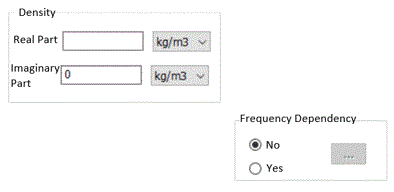
Setting Item |
Notes |
|
Density |
In the acoustic-harmonic analysis, enter the complex numbers. In the acoustic-transient analysis, enter the real numbers. |
|
Frequency Dependency |
Selectable for only acoustic-harmonic analysis. Select either Yes or No. When Yes is selected and Enter the frequency, and corresponding real part and imaginary part of the density. |
 is clicked,
 ![[Frequency-Density] Table](frequency-density_curve.gif)