


|
Home / How to Set Analysis Condition / List of Analysis Condition Tabs / Fluid-Thermal Tab
Fluid-Thermal Analysis Tab
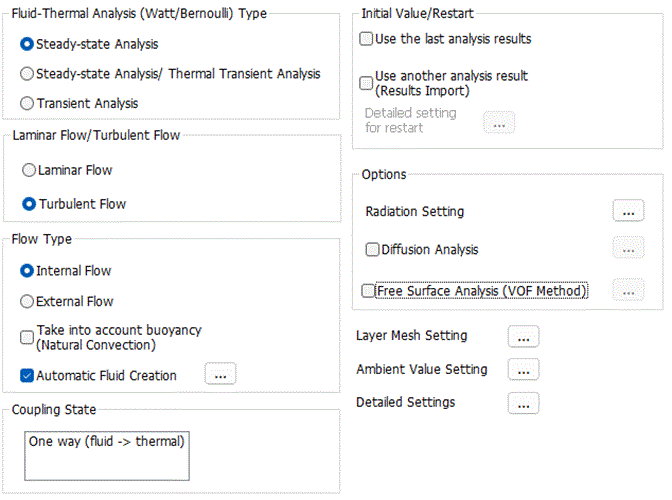
Analysis conditions for the fluid analysis are set on this tab. The solver is Bernoulli.
It is in the [Analysis Condition Setting] dialog box. See also [How to Set Analysis Condition].
|
Setting Item |
Notes |
|
Analysis Type |
Steady-State Analysis There is no time dependency.
Steady-state Analysis/ Thermal Transient Analysis The steady-state analysis is performed with the fluid solver. Using the results, the thermal transient analysis is performed. (only where no buoyancy is taken into account, the viscosity is not temperature-dependent, and material properties depending on ambient values are not used)
Transient Analysis Transient states are analyzed.
|
Options
|
Options |
Notes |
|||||||||||
|
Laminar Flow/Turbulent Flow |
Executes calculation assuming the flows are either laminar or turbulent.
|
|||||||||||
|
Flow Type |
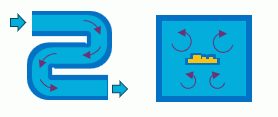
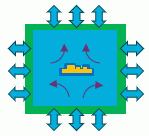
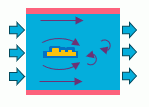
Internal flow or external flow can be selected.
This option affects two settings.
・ Outer boundary conditions are automatically determined. (The automatic determination can be deselected on the [Fluid tab (Fluid-Thermal tab)] of the outer boundary condition. Refer to [Outer Boundary Condition] for how to set outer boundary.)
Refer to [Boundary Condition of Fluid Analysis] of the Technical Notes for the details of outer boundary types.
・The fluid domain depends on whether internal flow or external flow is selected for the behavior of the automatically created fluid. (if [Automatic Fluid Creation] selected)
If [Internal Flow] is selected, a fluid domain is created inside the solid domain. If [External Flow] is selected, a fluid domain is created outside the solid domain.
Select Take Buoyancy into Account (Natural Convection) to calculate the natural convection.
This option must be selected if there are no forced inflow or forced outflow. If this option is not selected, the convection will not occur in the closed domain. (Only thermal conduction is taken into account for the heat transfer.)
if [Automatic Fluid Creation] is selected, a model of fluid can be automatically created. The model of fluid is automatically created based on whether the internal or external flow is selected. Click the button
|
|||||||||||
|
Initial Value/Restart |
If Use another analysis results (Results Import) is selected, an analysis model that was already analyzed or the results file is used as the initial values for the calculation. The analysis model or the results file is specified on the [Results Import tab]
Click the[Detailed Setting for Restart]
If Calculate quasi-steady state is selected, the analysis with finite timesteps is applied when restarting.
If Hand over the time is selected, the time of the previous analysis results or another analysis results is handed over. If the results of the previous analysis were up to 10 s for example, this option allows the analysis to continue without removing the results up to 10 s of the previous analysis. If the analysis type of fluid solver is steady-state or if transient analysis is applied for the thermal or diffusion analysis, all the previous results are removed and the analysis starts at 0 s.
|
|||||||||||
|
Radiation Setting |
Enables the settings relating to the radiation. ・Outer boundary condition setting ・Default value of emissivity ・Emissivity of each body attribute ・Emissivity of each boundary condition Click |
|||||||||||
|
Diffusion Analysis |
For diffusion analysis, select [Diffusion Analysis] in the [Option]. See Diffusion Analysis of technical note for more information. Click |
|||||||||||
|
|
|
|||||||||||
|
Free Surface Analysis (VOF Method) |
For free surface analysis (VOF method), select [Free Surface Analysis (VOF method )] in the [Option]. See [Free Surface Analysis (VOF method)] for more information. Click |
|||||||||||
|
|
|
|||||||||||
|
Layer Mesh Setting |
Click this button |
|||||||||||
|
Ambient Value Setting |
Refer to the [Ambient Value Setting] tab for more information.
In the fluid thermal analysis, set the ambient temperature on the [Ambient Value Setting] tab.
The ambient temperature is used in the following ways.
・Reference temperature for buoyancy
The buoyancy is calculated using the temperature difference from the ambient temperature.
・Inflow temperature, wall face temperature, and ambient temperature for boundary condition on the [Fluid tab (Fluid-Thermal tab)].
・Ambient temperature and ambient radiation temperature on the [Thermal tab].
・Unless specified individually, the ambient temperature set here is used as the ambient radiation temperature.
・Initial temperature for a transient analysis
・[Heat flux] on the result field
Heat flux is the sum of the heat flux by thermal conduction and the heat flux by advection. The heat flux by the advection is calculated as "flow velocity" x "density" x "enthalpy".
・[Coefficient of heat transfer for convection] on the result field.
It is calculated as "heat flux on wall face"/("wall face temperature" - "ambient temperature").
・Advection components of the heat balance and the heat flow rate.
The heat flow rate by the advection is calculated as "flow velocity" x "density" x "enthalpy". Ambient temperature is used as a reference temperature for the enthalpy.
Click
|
|||||||||||
|
Setup Details |
Click
|
|||||||||||
|
Coupling State |
If the temperature dependency of density (buoyancy) and of viscosity, non-Newtonian fluid, and material properties depending on ambient values are taken into account, the analysis is bidirectional (thermal to fluid and fluid to thermal).
<One directional coupling: fluid ⇒ thermal> The fluid analysis is performed first, then the thermal analysis is performed.
<Bi-directional coupling: fluid ⇔ thermal> The fluid analysis and the thermal analysis are performed alternately. |
|||||||||||
 . The
. The 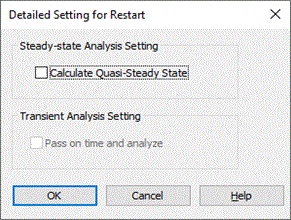
 Different analysis conditions from the previous analysis can be applied as well.
The Relating Tabs
The relating tabs are [High-Level Setting], [Transient Analysis], and [Monitoring].
How to Modify Analysis Conditions
To modify the analysis conditions,
on the [Model] tab,

click [Analysis Condition]  . The dialog box will appear.