


|
Home / How to Set Body Attribute, Material Property and Boundary Condition / Material Property Tabs / Solid/Fluid Tab
Solid/Fluid Tab
The material is set either as solid or as fluid on this tab.
It is in the [Edit Material Property] dialog box. See [How to Set Body Attribute/Material Property].
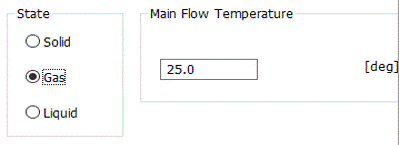
|
Setting Item |
Notes |
|
State |
Selects the state of the body from solid, gas, or liquid.
Solid: The body is treated as solid.
Gas: The body is treated as fluid.
Liquid: The body is treated as fluid.
|
|
Main Flow Temperature |
Used in the simple fluid-thermal analysis [Pascal/Watt]. If the state is gas or liquid, set the main flow temperature.
In the simple fluid-thermal analysis, the main flow temperature is used as the ambient temperature for the heat transfer boundary. See [Simple Fluid-Thermal Analysis by Femtet] for more details.
|