|
Home / Examples / Thermal Analysis [Watt] / Example 27: Radiation Blocked by a Disc (Steady-state Analysis) -Simple Setting-
Example 27: Radiation Blocked by a Disc (Steady-state Analysis) -Simple Setting-
General
-
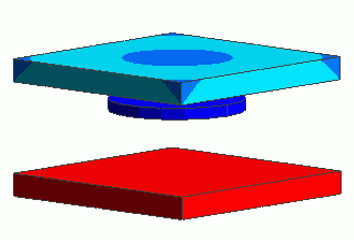
A disc is inserted in a space created by two plates.The heat radiation from one plate to the other is blocked by the disc.
A problem similar to [Example 16: Radiation Blocked by a Disc (Steady-state Analysis) ] is set up in a simpler way.
(Refer to the default setting of [Radiation: Equations and Setting Method.)
-
The temperature distribution and the heat flux vectors are solved.
-
Unless specified in the list below, the default conditions are applied.
-
Obtain this session's project file. (Right-click and choose 'Save link as')
-
Results will vary depending on Femtet version and the PC environment.
Analysis Space
|
Item |
Settings |
|
Analysis Space |
3D |
|
Model Unit |
mm |
Analysis Conditions
|
Item |
Settings |
|
Solver |
Thermal Analysis [Watt] |
|
Analysis Type |
Steady-state Analysis |
|
Analysis Options |
None |
Model
A disc is placed in between two plates.
The temperature of the bottom face of the lower plate is fixed at 1000 [deg]. The natural convection and surface-to-surface radiation are set to the surroundings.
How the disc affects the radiation to the upper plate is analyzed.
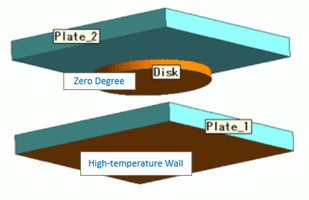
Body Attributes and Materials
|
Body Number/Type |
Body Attribute Name |
Material Name |
|
0/Solid |
Plate_1 |
008_Cu |
|
1/Solid |
Disk |
002_Polycarbonate(PC) |
|
2/Solid |
Plate_2 |
002_Polycarbonate(PC) |
The emissivity of each body attribute surface is set as follows.
|
Body Attribute Name |
Tab |
Settings |
|
Plate_1 |
Thermal Surface |
Emissivity: 0.5 |
|
Plate_2 |
Thermal Surface |
Emissivity: 0.5 |
|
Disk |
Thermal Surface |
Emissivity: 0.99 |
Boundary Condition
The boundary conditions are set as follows:
|
Boundary Condition Name/Topology |
Tab |
Boundary Condition Type |
Settings |
|
Outer Boundary Condition |
Thermal |
Heat Transfer/Convection |
Natural Convection (Automatic Coefficient Calculation) Radiation Type: Surface-to-Surface (Accuracy Prioritized) |
|
HighTemperatureWall/Face |
Thermal |
Temperature |
1000 [deg] Radiation Type: Follow the outer boundary condition |
|
0/Face |
Thermal |
Temperature |
0 [deg] Radiation Type: Surface-to-Surface (Accuracy Prioritized) |
The radiation setting can be done at [Thermal Analysis tab] > [Radiation Setting] dialog box as well.
Shown below are the setting details.

The outer boundaries of the three bodies are treated as surfaces for the surface-to-surface radiation. The emissivities for each body attribute is viewed.
By clicking [Show all boundary conditions set for the body attribute], the display is switched as shown below.

As set for each item, [0] for Disk and [High Temperature Wall] for Plate_1 are displayed.
[Follow the outer boundary condition] is set to each of them and [Surface-to-surface (accuracy prioritized)] is set as an outer boundary condition. It is confirmed that all surfaces are treated as those for the surface-to-surface radiation.
Results
The diagram below shows the temperature distribution of the upper plate.
(The body fields for the other bodies are hidden (right-click > hide body field).)
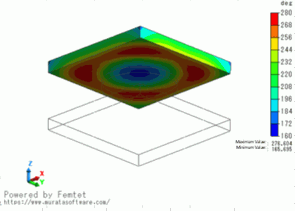
The center area is around 160[deg] whereas the other area is over 260[deg].
The disc is blocking the heat radiation.
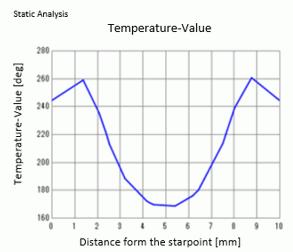
The plot below indicates the temperature across the two points: (5, 0, 5) and (5, 10,5).